
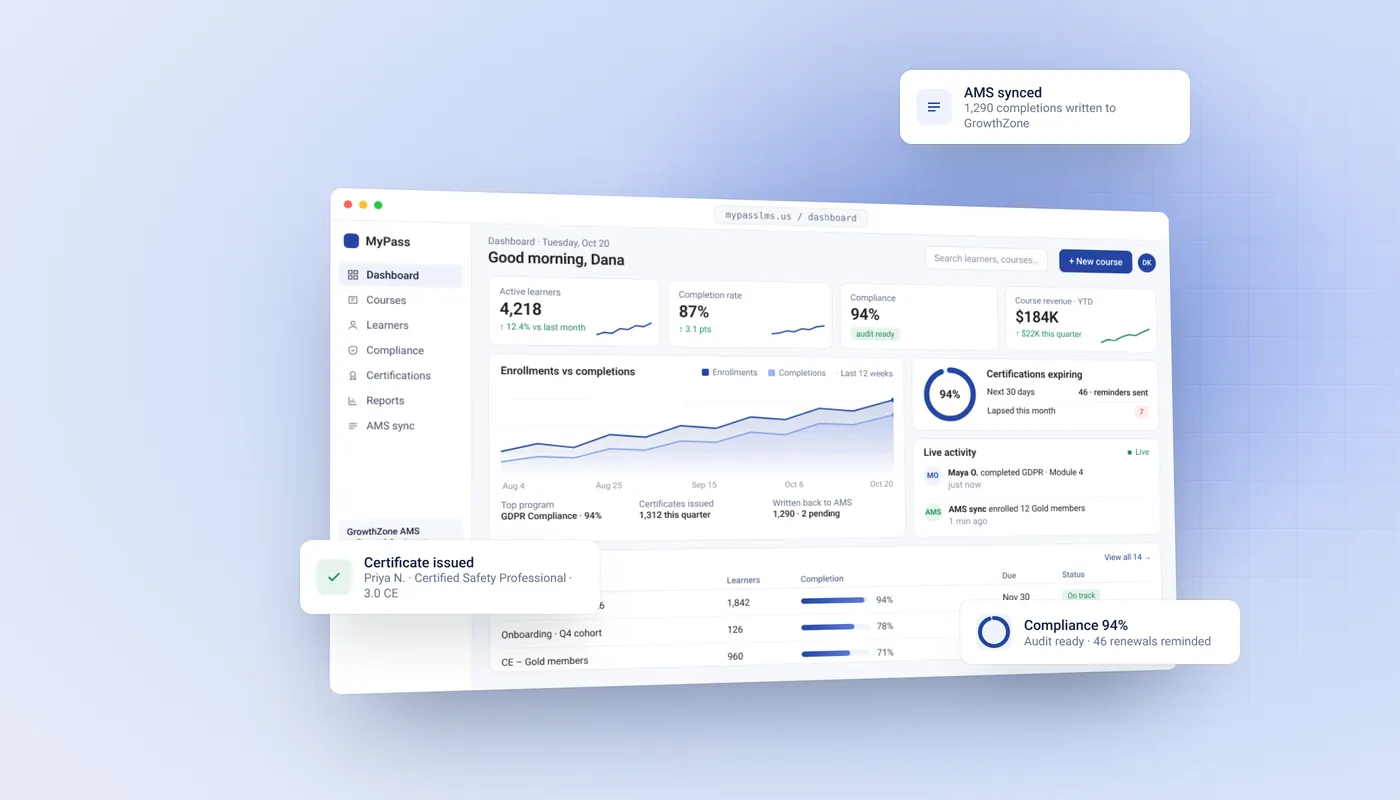


The LMS for associations that stays in step with your AMS.
MyPass runs member education, CE credits and certification programs, and keeps every learner record matched to your membership system. Use it to:
- ✓Enroll members by tier when their AMS record changes
- ✓Write completions and CE credits back to the member record
- ✓See who is current, expiring or lapsed before renewals
- ✓Sell courses to non-members, with no commission to Kprise
Or download the free Community Edition →
Unlimited members · No per-seat fees · 20% off for eligible associations
Two-month trial for associations · No credit card

















What an LMS for associations actually does
An LMS for associations is a learning management system built for member-based organizations. It delivers member education and certification programs, tracks continuing education (CE) credits for each accrediting body, sells courses to members and non-members at different prices, and stays connected to your association management system (AMS), so members sign in once and every completion lands on their member record. A corporate LMS is built to train employees; an association LMS is built to serve members, protect credentials and earn non-dues revenue.
MyPass does all of that with unlimited members on every plan, published prices and no commission on course sales. Read the full guide to association LMS platforms.
What syncs, and what stays in your AMS
Your AMS stays the system of record for membership. MyPass is the system of record for learning. This is the boundary between them, object by object, including the things MyPass deliberately does not touch.
| Data | Direction | When | Stays in your AMS |
|---|---|---|---|
| Member record and profile | AMS → MyPass | On change | Creating and deleting members. MyPass never creates a member record. |
| Membership tier and status | AMS → MyPass | On change | Dues, renewals, invoices and payment status. |
| Course enrollment | Tier rule → MyPass | On tier change | — |
| Course completion | MyPass → AMS | On completion | — |
| CE credit (hours, accrediting body) | MyPass → AMS | On completion | Credit earned outside MyPass, unless you import it. |
| Certificate and credential record | MyPass → AMS | On issue and renewal | — |
| Custom member fields | Both ways | On change | — |
| Chapter or component assignment | AMS → MyPass | On change | The chapter structure itself. MyPass reads it and never writes it back. |
| Sign-in (SSO) | AMS → MyPass | Each session | Passwords. MyPass never stores or receives AMS credentials. |
| Event registration and attendance | Not synced | — | All of it. Only the CE credit an event awards is recorded in MyPass. |
| Course purchases (non-dues revenue) | Recorded in MyPass | On transaction | Membership dues and renewal billing. |
AMS platforms MyPass connects to. The AMS connectors come with every plan, with no monthly add-on. Connecting one to your AMS is a one-time setup service: tell us which platform you run, and we will show you what syncs for yours and quote any cost before you commit.
Three programs associations run on MyPass, from one workspace
Each one has its own enrollment rules, branding and reporting. Members see one portal.
Certification programs
Run professional certification end to end: prerequisites, proctored exams, certificate issue and renewal cycles.
- Webcam-proctored exams with a review queue
- Prerequisite rules before a candidate can sit
- Automatic PDF certificates on a pass
- Renewal reminders and lapsed-certificate workflows
CE programs for credentialed members
Track continuing-education credits across accrediting bodies, with evidence ready year-round.
- Credit rules per course and accrediting body
- Credits written back to the AMS member record
- Reminders to members before credits expire
- Audit reports by member, year or board
Member education and professional development
On-demand libraries, instructor-led sessions and webinar replays without a separate stack.
- On-demand courses, SCORM and webinar replays
- Tier-based access: premium tiers see more
- Instructor-led session scheduling and attendance
- Add-on library of ready-made courses
What MyPass includes, and what to check with other vendors
Plenty of LMS platforms are strong at courses, and some handle parts of this well. When an AMS is in the picture, these are the areas that most often turn into add-ons, extra licenses or custom work. Ask any vendor you are evaluating about each one.
| Capability | MyPass for associations | Common additional requirements elsewhere |
|---|---|---|
| AMS integration | ✓ Part of the platform; member fields, tiers and credits flow both ways | Ask whether the connector is native, a partner add-on, or a custom build |
| CE and continuing-education tracking | ✓ Built in, with audit reports | Sometimes a paid module, or tracked outside the LMS |
| Enrollment driven by member tier | ✓ Automatic from the AMS record | Often set up with imports or scripts |
| Selling courses to non-members | ✓ In the same system, no commission | Sometimes a separate e-commerce tool or a revenue share |
| Separate portals for members, public and partners | ✓ Each with its own branding and access rules | Sometimes an extra license per portal |
| SCORM support | ✓ Included | Usually included |
| Pricing | ✓ Unlimited registered users; priced by hosting | Often per seat or per active user |
| Time to go live with AMS sync | ✓ Typically two to six weeks | Varies with how the integration is delivered |
Guides for associations choosing an LMS
Plain-English guides to the questions associations ask most before they choose a platform.
What is an association LMS?
What it does, how it differs from your AMS, and how to tell whether you need one yet.
Read the guide →LMS and AMS integration guide
Which data syncs in which direction, the ways integrations fail after go-live, and what to ask before you sign.
Read the guide →AMS vs LMS: which system owns what
What the AMS should own, what the LMS should own, and the four things that must cross between them.
Read the guide →Association LMS for continuing education
Credit rules per course, multiple accrediting bodies, expiry and the audit test to run on every vendor.
Read the guide →Membership tiers in an association LMS
How tiers map to course access and pricing, and what happens when a member lapses or renews.
Read the guide →Best LMS for associations
Eight association LMS platforms compared on fit, features, price and caveats, with a demo script for finalists.
Read the guide →What it costs
Unlimited members. No per-seat fees. No commission on course sales. No setup fee for standard hosting; connecting your AMS is scoped and quoted separately.
That price includes the nonprofit discount. Private Hosting gives you your own domain and SSL, a dedicated environment, up to 1,000 people logged in at once, and priority support.
For comparison: a per-seat LMS at $2 a user a month costs about $2,000 a month for a 1,000-member roster, and more every time membership grows.
What associations ask before they sign
What is an LMS for associations?
An LMS for associations is a learning management system built for member-based organizations. It delivers member education and certification programs, tracks CE credits per accrediting body, sells courses to members and non-members at different prices, and syncs with your AMS so completions land on the member record.
How much does an association LMS cost?
Many association LMS vendors only quote after a demo. MyPass publishes its prices: hosted plans are $99 a month ($79 billed annually) or $319 a month ($249 billed annually), and eligible associations get 20% off on top of annual billing, $63.20 or $199.20 a month. Every plan has unlimited members. Connecting your AMS is scoped and quoted separately.
What should we look for in an LMS for associations?
Six things: a working integration with your specific AMS (ask to see it with your own system), CE rules per course and per accrediting body, member and non-member pricing, certification renewals and proctored exams, reports your accreditors accept, and pricing that does not charge per member as you grow. Our comparison of LMS platforms for associations applies these criteria vendor by vendor.
Does MyPass replace our AMS?
No. Your AMS stays the system of record for membership, dues and events. MyPass is the system of record for learning, and the two stay in step through the sync described above.
Which AMS platforms do you connect to?
iMIS, Nimble AMS, MemberClicks, Fonteva, NetForum, YourMembership, GrowthZone, Personify, Impexium and Wild Apricot. Coverage differs by platform. Tell us which one you run and we will confirm what moves before you commit.
Can non-members buy our courses?
Yes. Public certification programs and course sales run in the same system, with their own pricing and branding. Kprise takes no commission on those sales; you pay only your payment processor's standard card fee. Purchases are recorded in MyPass; dues and renewal billing stay in the AMS.
We report CE to more than one accrediting body. Does that work?
Yes. Credit rules are set per course and per accrediting body, and reports can be pulled by member, year or board.
What about events and conferences?
Event registration and attendance stay in your AMS. Only the CE credit an event awards is recorded in MyPass, so the member's credit history is complete in one place.
How long does it take to go live?
A hosted trial starts the day you sign up. With AMS sync, most programs are live in two to six weeks, depending on the platform and how many custom fields you need mapped.
Do you charge per member?
No. Registered users are unlimited on every plan. Hosted plans are priced by hosting type and by how many people can be logged in at the same time.
Stop reconciling rosters. Start running the program.
Start a free hosted trial, or book a 30-minute call and tell us your AMS and your CE rules and we will confirm exactly what syncs for your platform before you commit to anything.
Unlimited members · 20% association discount · Two-month trial