
Extended enterprise training for the people you do not employ
MyPass LMS is an extended enterprise LMS for training partners, customers, contractors and franchisees alongside your own staff. Each audience gets its own courses, learning paths and certificates, everyone signs in to a portal with your branding, and you pay a flat plan with unlimited registered users.
- A separate group for each outside audience, with its own catalog
- Certificates with expiry dates for partners and contractors
- Sell courses to customers through Stripe, no MyPass commission
- One set of reports across every audience you train
Or download the free Community Edition →
Unlimited registered users · flat monthly pricing · 15-day free trial, no credit card
A tool per audience turns into a tool per problem
Most companies start training outsiders with whatever is closest: a guest seat on the internal LMS, a webinar series, a shared folder. Each new audience adds another system, another login and another export.
Outside training, piece by piece
- ✕Partners, customers and contractors each live in a different tool
- ✕Guest accounts on the internal LMS cost a seat each
- ✕Certificates are PDFs nobody tracks once they are sent
- ✕Answering who is trained means merging exports by hand
Extended enterprise on MyPass LMS
- ✓One platform, with a group and catalog for each audience
- ✓Unlimited registered users, so every partner can have an account
- ✓Certificates issue automatically and remind before they expire
- ✓Reports filter by audience, course or date and export to Excel
Partners see partner courses. Contractors see contractor courses.
Put each outside audience in its own group with its own catalog, learning paths and due dates. Learners can register themselves, arrive in a bulk upload or be created through the REST API, and enrollment by group happens automatically.
- Groups and roles control what each audience can see
- Auto-enrollment into the right path when someone joins a group
- Your own employees train on the same platform, in their own groups
- ✓ Added to group: Site contractors
- ✓ Path: Site safety induction
- ✓ Sees contractor catalog only
- ✓ Due date set from sign-up
Know which partners are certified, and when that runs out
Build a certification program with a learning path, a timed exam from a question bank and a certificate that issues the moment someone passes. MyPass tracks the expiry date and reminds the learner, and you, before recertification is due.
- Question banks and pools so each candidate gets a different exam
- Certificates with expiry dates and recertification reminders
- Live training on Zoom or Microsoft Teams, with attendance recorded
Charge for courses and certifications from the same catalog
Publish a course catalog and sell courses with Stripe checkout. Payments go to your Stripe account and MyPass takes no commission. Free onboarding for customers and paid advanced courses can sit side by side.
- Stripe checkout with no MyPass commission
- White-label branding with your logo and colors
- Your own domain and SSL on Private Hosting
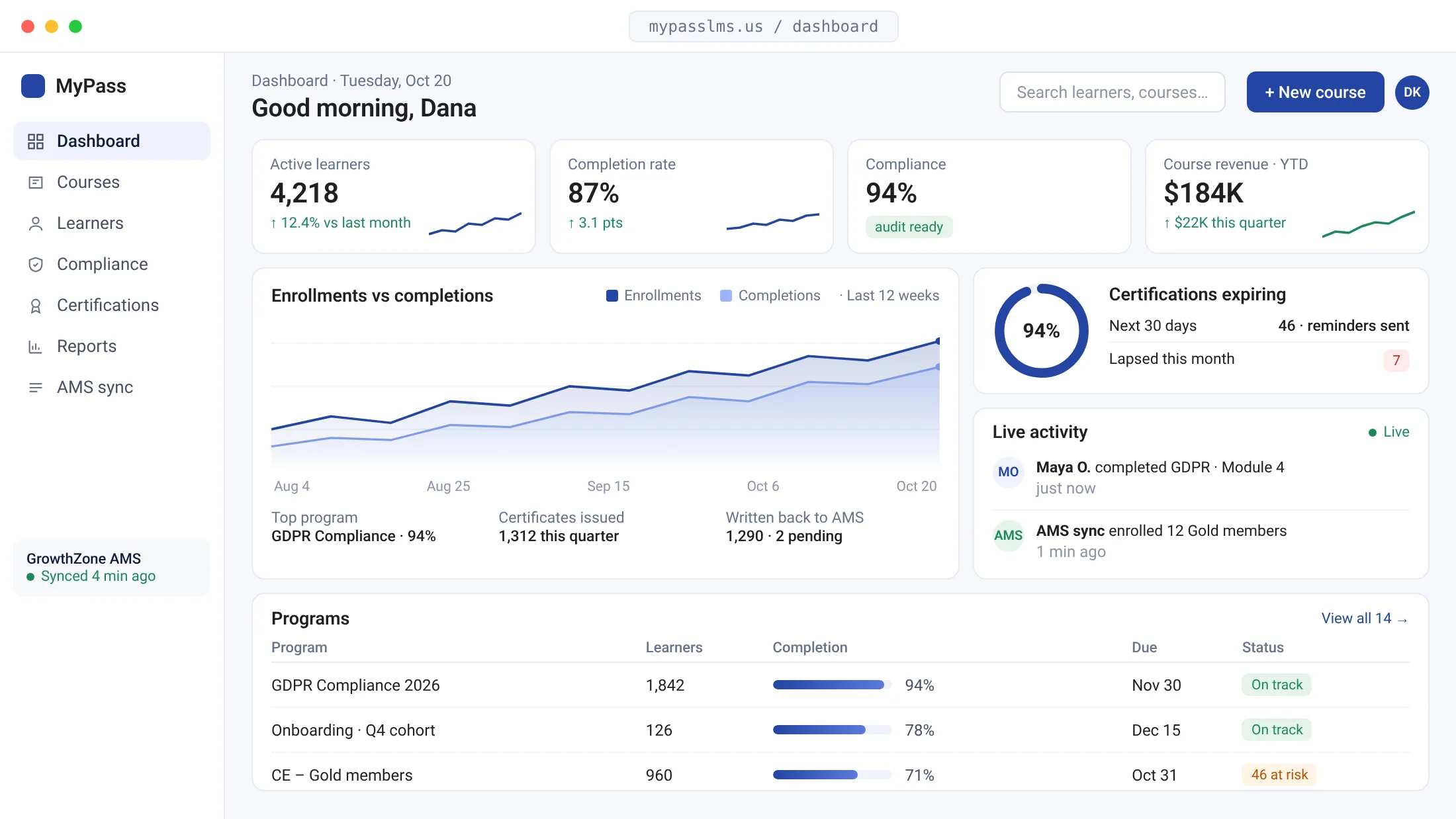
One report for everyone you train, filtered however you need
Dynamic Reports pull completions, scores and certificates from every group into one place. Filter by audience, course, company or date, then export to Excel for the partner manager, the safety lead or the customer success team.
- Filter by group, course, date or learner
- Expiring certificates flagged before they lapse
- Export to Excel, or pull the data through the REST API
| Group | Program | Status |
|---|---|---|
| Installer partners | Certified installer | Expiring in 30 days |
| Customers | Admin onboarding | In progress |
| Site contractors | Safety induction | Complete |
| Franchise staff | Brand standards | Overdue |
Start with one audience, add the next when ready
Pick the first audience
Most teams start with the group that causes the most follow-up, often contractors or partners. We help you map their courses and certificates during setup.
Set up groups and branding
Create a group, attach a learning path, add your logo and colors, and choose how learners sign up.
Invite and add more
Send the sign-up link, watch completions arrive, then add customers or franchisees as new groups on the same platform.
Connects to the tools your outside learners already touch
MyPass compared with a separate tool per audience
| MyPass LMS | Internal LMS plus separate tools | |
|---|---|---|
| Adding thousands of outside learners | Unlimited registered users on a flat plan | A paid seat or add-on for each external user |
| Keeping audiences apart | Groups with their own catalog, paths and reports | A separate tool or instance for each audience |
| Charging for training | Stripe checkout built in, no MyPass commission | A separate storefront connected by hand |
| Reporting | One report across all groups, exportable to Excel | Exports from each tool merged in a spreadsheet |
Extended enterprise questions, answered
What is extended enterprise training?
Extended enterprise training is training for people outside your organization who affect your results: resellers, customers, contractors, suppliers, franchisees and members. An extended enterprise LMS lets you train those audiences on the same platform as your staff, with separate content and reports for each.
How is this different from customer or partner training?
Customer training and partner training are single audiences within the extended enterprise. If you only train one of them, start there. If you train several, one platform with a group per audience saves separate tools. See our page on partner and channel training.
Can partners or customers see our internal courses?
No. Each audience sits in its own group, and groups and roles decide which courses, paths and reports a learner can see. Your employees can train on the same platform without their content showing up for partners, contractors or customers.
Do outside learners count against a user limit?
Registered users are unlimited on every plan, so there are no per-seat fees for partners or customers. Plans differ by simultaneous logins: Shared Hosting allows up to 50 at once and Private Hosting up to 1,000. Enterprise plans are custom.
Can we charge customers for courses or certifications?
Yes. MyPass includes a course catalog with Stripe checkout. Payments go to your own Stripe account and MyPass takes no commission. You can offer free onboarding courses and paid advanced courses or certifications in the same catalog.
Will the portal carry our brand?
Yes. White-label branding puts your logo and colors on the learner portal and certificates. Private Hosting adds your own domain with SSL, so outside learners see your academy rather than a vendor name, and certificates they share carry your brand too.
More on training beyond your walls
Train your first outside audience this month
Start a free hosted trial and set up a partner or contractor group today, or book a 30-minute demo and we will map your audiences with you.
15-day trial · No credit card · Unlimited registered users