
QR Code Attendance Tracking for Training Sessions
QR code attendance tracking for training sessions: setup steps, fields each check-in should capture, anti-proxy controls and fallbacks for no-phone attendees.
On this page 10 sections
- How QR check-in works at an in-person session
- How to set up QR code attendance tracking, step by step
- What data each check-in should capture
- QR code vs paper sign-in sheet vs roll call vs kiosk
- How to stop buddy and proxy check-ins
- Handling attendees without smartphones
- Turning attendance into completion, CE credit and audit evidence
- What QR attendance does not prove
- Pre-session checklist for QR attendance
- Frequently asked questions
Short answer
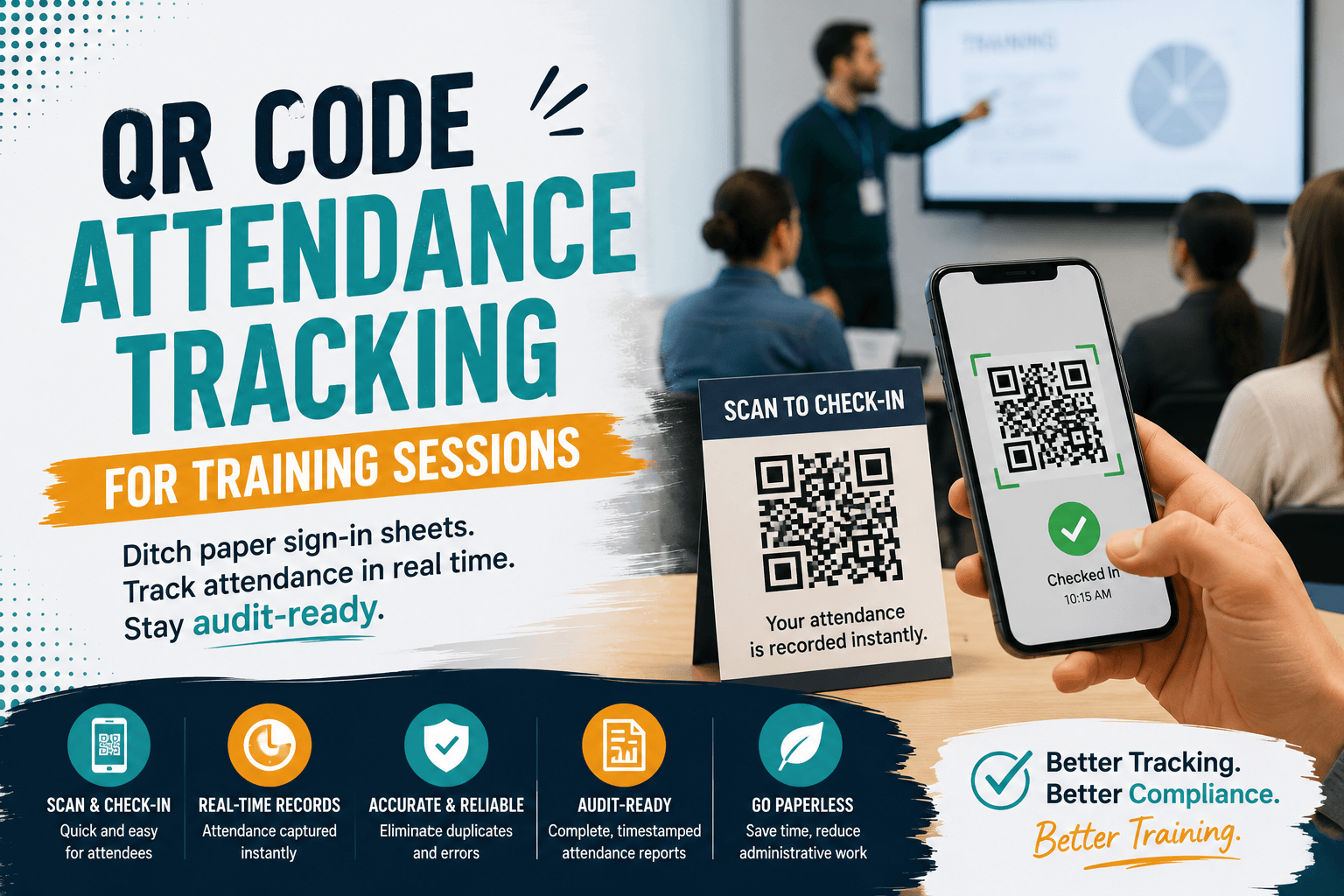
QR code attendance tracking for training works like this: you create the session, display a QR code that belongs only to that session, and attendees scan it with their phones on arrival. Each scan writes a timestamped attendance record against the learner's account, so there is no sign-in sheet to transcribe, lose or misread later.
For safety briefings, toolbox talks, clinical competency sessions and accredited workshops, the attendance record is often the only evidence the training happened. A paper sheet that gets typed up a week later (or never) is the weakest link in most instructor-led training programs. This guide covers how to set up QR check-in, what each record should contain, how to stop proxy check-ins, what to do for people without smartphones, and how to turn scans into completion, CE credit and audit evidence.
How QR check-in works at an in-person session
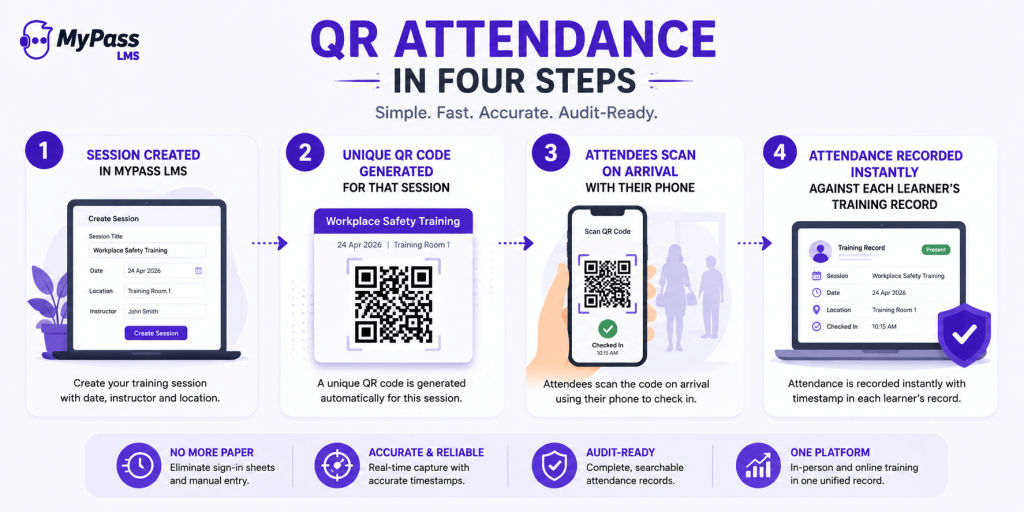
There are two common models, and it helps to decide which one you are running before you buy or configure anything:
- Learner scans the session code. The instructor shows one code on a screen or printed sign. Each attendee scans it with their own phone and is identified by their logged-in learner account. This is the fastest model for rooms of 10 to 200 people and needs no hardware.
- Instructor scans the learner's code. Each attendee carries a personal code (on a badge, ID card or ticket) and the instructor or a door volunteer scans it with a tablet or phone. This is slower per person but works when attendees have no phones or cannot use them on site.
Most organizations run the first model and keep the second as a fallback. Either way, the scan is only useful if it links to an existing learner record. A QR code that opens an anonymous web form gives you a digital sign-in sheet with all the same identity problems as paper.
How to set up QR code attendance tracking, step by step
- Create the session as its own record. Enter the course title, date, start and end time, venue or room, and instructor. A recurring workshop needs a separate session per date, or you cannot tell which date someone attended.
- Enroll or register attendees first. Pre-registration means the scan only has to confirm presence, not create a new person. Some platforms require it: Bridge, for example, states that scanning does not register a learner, so unregistered attendees get no credit.
- Write your attendance rules before the session. Decide when check-in opens, when someone counts as late, whether a check-out scan is required, and who may correct a record. Put the rules in the session description so attendees see them.
- Generate the session's QR code. Test it from two different phones (one iOS, one Android) on the venue's actual network, not your office Wi-Fi.
- Display it in the room, not in the invite. Put it on the opening slide or a printed sign by the door. A code sent by email is a code that can be scanned from home.
- Watch the live list during the first 15 minutes. Compare the checked-in count with a quick headcount. If they differ by more than one or two, find out why while everyone is still in the room.
- Handle exceptions on the spot. Mark anyone without a phone or with a failed scan using your fallback method, and note the reason.
- Close the session within 24 hours. The instructor confirms the list, marks completion for those who met the rules, and the record locks. Any later change should leave an audit trail showing who changed what and why.
In MyPass LMS
In MyPass LMS, you create the session with its date, instructor and location, and the platform generates a unique QR code for that specific session. Attendees scan it on arrival with their phones, which identifies them against their existing learner account, and attendance is recorded instantly with a timestamp against each person's training record.
What data each check-in should capture
Start from what an auditor or accrediting body will ask for, then work backward. OSHA's bloodborne pathogens standard is a useful model because it spells out the contents: training records must include the dates of the sessions, the contents or a summary of the training, the names and qualifications of the people conducting it, and the names and job titles of everyone attending, kept for three years (29 CFR 1910.1030(h)(2)). A well-designed check-in record covers all of that plus the timing data you need for duration rules.
| Field | Why you need it | Where it should come from |
|---|---|---|
| Learner name and unique ID | Proves who attended; IDs prevent mix-ups between people with the same name | Learner account (not typed at the door) |
| Job title, department or member ID | OSHA-style records ask for job title; associations need member ID for CE transcripts | Learner profile or AMS sync |
| Session ID, course title and date | Ties the scan to one specific delivery of the course | Session record |
| Check-in timestamp | Shows arrival time; flags late arrivals against your rules | Recorded at scan |
| Check-out timestamp (if used) | Needed when credit depends on minutes attended | Second scan at the end |
| Instructor name and qualification | Required by several regulations and most accreditors | Session record |
| Venue or room | Supports location checks and explains which site trained whom | Session record |
| Content summary or agenda | Shows what was covered, not only who was there | Course or session description |
| Check-in method | Separates QR scans from manual entries so exceptions can be reviewed | Set automatically (QR, instructor, kiosk) |
| Completion status and credit awarded | Turns attendance into a training outcome | Set by instructor or completion rule after the session |
Key point
Collect the minimum. Device type, GPS coordinates and IP addresses are tempting to store "just in case," but if you use location for verification, keep the pass/fail result rather than the raw coordinates. You will have less personal data to protect and nothing auditors need is lost.
QR code vs paper sign-in sheet vs roll call vs kiosk
| Criteria | QR code (learner scans) | Paper sign-in sheet | Manual roll call | Kiosk or tablet at the door |
|---|---|---|---|---|
| Time to check in 30 people | 2 to 3 minutes, in parallel | 5 to 10 minutes as the sheet circulates | 3 to 5 minutes of session time | Queue at one device; slowest for large groups |
| Data entry afterwards | None | Every name re-typed | Instructor enters list | None |
| Identity confidence | Medium to high (tied to login) | Low (anyone can sign any name) | Medium (instructor knows faces in small groups) | Medium to high with badge or PIN |
| Timestamp | Automatic, per person | None, unless people write the time | One time for the whole group | Automatic, per person |
| Legibility errors | None | Frequent | Spelling errors on entry | None |
| Needs attendee phone | Yes | No | No | No |
| Hardware cost | None | None | None | One device per entrance |
| Best fit | Most office, conference and classroom sessions | Emergency backup only | Groups under 10 where everyone is known | Shift workers, phone-free sites, high-volume entrances |
Timing figures are typical ranges from running sessions, not benchmarks. A workable decision rule: use learner-scan QR as the default, a kiosk where phones are banned or unreliable, roll call for very small known groups, and paper only when everything else fails. Whatever you choose, the result should land in the same system you use for tracking the rest of your employee training, or you have just moved the transcription problem.
How to stop buddy and proxy check-ins
The main weakness of a static QR code is that it can be photographed and forwarded to a colleague who never shows up. Researchers at the University of East Anglia describe the same problem set, proxy attendance, buddy-punching and early departure, in their paper on attendance fraud mitigation. Layer the controls below according to the stakes of the session.
Limit check-in to a time window
Only accept scans from shortly before the start until a set point after it. Bridge, for example, activates its session code 15 minutes before the scheduled start and stops it when the session ends. For credit-bearing sessions, a tighter cutoff (say, 10 minutes after start) is easier to defend.
Use rotating codes
A dynamic code refreshes every few seconds while it is on screen, so a forwarded photo is already expired by the time it arrives. Edusign describes this as the most effective defense against false entries. If your tool does not rotate codes, the time window plus displaying the code only in the room gets you much of the way.
Check location
Some systems compare the phone's location with the venue boundary. The UEA approach encodes the venue's polygon coordinates in the code so the system can test whether the person scanning is inside it. Location checks are less reliable in basements and large buildings, so treat a failure as "review" rather than "reject."
Add a check-out scan and a headcount
A second code shown in the final five minutes catches people who scan in and leave. A 10-second headcount compared against the live list catches nearly everything else, and costs nothing.
Tip
Match the controls to the stakes. A lunch-and-learn needs a time window and nothing more. A session that grants CE credit or satisfies a regulatory requirement should add a check-out scan and a headcount. Licensing-critical training may justify rotating codes or a staffed door with ID checks.
Handling attendees without smartphones
Smartphone ownership is high but not universal. Pew Research Center's 2026 survey found 91% of U.S. adults own a smartphone, which still means roughly one person in eleven does not. Add workers whose phones stay in lockers on production floors, clean rooms or secure sites, plus dead batteries and app login failures, and every session needs a fallback.
- Instructor marks them present in the attendance list from their own device, with the check-in method recorded as manual.
- A shared tablet or kiosk at the door where the person signs in with their ID or a PIN.
- A personal code on a badge that the instructor scans (the second model described above).
- A short paper backup sheet, entered the same day by the instructor, never left in a folder.
Whichever you use, keep exceptions visible. If 30% of a session is checked in manually every week, the process is not working for that group and a kiosk or badge model will serve them better.
Turning attendance into completion, CE credit and audit evidence
Attendance is an input. What auditors, accreditors and members actually ask for is a completion record and, for accredited programs, a credit transcript. Define the rule that converts one into the other before the session, and apply it the same way every time.
- Completion rule. For example: checked in within 10 minutes of start, checked out in the final 5 minutes, and passed the post-session quiz.
- Credit rule. Accreditors set their own thresholds. The Associated General Contractors of America, an IACET provider, requires participants to attend at least 95% of classroom sessions to earn IACET CEUs, does not offer partial credit, and defines one CEU as 10 contact hours. Check your own accreditor's rules; our guide to what CEUs are and how they are counted covers the common systems.
- Certificate. Issue it from the completion record, not from attendance alone, so the certificate and the transcript always agree.
- Audit packet. For each session keep the attendee list with timestamps, the agenda or content summary, instructor details, the assessment results, and a log of any manual edits. Retain it for at least as long as the strictest rule that applies to you.
Example
A 3-hour workshop under a 95% attendance rule needs 171 minutes of documented presence. An attendee who scans in 12 minutes late and stays to the end has 168 minutes and does not qualify. With timestamps on check-in and check-out you can make that call in seconds and show your working; with a paper sheet you are guessing.
This is also where in-person training usually falls out of the record. If classroom attendance lives in a spreadsheet and online modules live in the LMS, no single report shows who is fully trained. Keeping both in one system is what makes a single audit report possible, and it is the core requirement for compliance training that mixes classroom and online delivery.
In MyPass LMS
In MyPass LMS, QR attendance connects to instructor-led session management, set up through ILT Scheduling, so the session, its instructor, its venue and its attendee list are one object, with attendance shown on the session's Attendance Sheet. In-person attendance and online course completion sit in one record, and completion feeds the same compliance tracking as any online course.
What QR attendance does not prove
A scan proves presence, not attention or understanding. Someone can check in and spend the session on email. For anything high-stakes, pair the session with an assessment or a practical sign-off so you have evidence of competence as well as attendance. And confirm how your system behaves with weak signal before you rely on it in a basement training room or a remote site: some tools queue scans offline, others simply fail.
Pre-session checklist for QR attendance
- Session record created with date, start and end time, venue and instructor.
- Attendees enrolled or registered, and the roster exported in case of an outage.
- Attendance rules written: check-in window, late cutoff, check-out requirement, completion rule.
- QR code generated and tested on iOS and Android, on the venue network.
- Code placed on the opening slide and a printed sign by the door, not emailed.
- Check-out code or slide ready for the final five minutes, if required.
- Fallback ready: instructor access to mark attendance, a kiosk, or a backup sheet.
- Agenda or content summary attached to the session for the audit record.
- Assessment or sign-off ready if the session grants credit or certification.
- Owner named for closing the session and confirming completions within 24 hours.
Frequently asked questions
How does QR code attendance tracking work for training?
You create a session record and generate a QR code unique to it. Attendees scan the code with their phones when they arrive, and the system matches each scan to the person's learner account and stores a timestamp. The attendance list builds itself during the session, so there is no sign-in sheet to collect or retype afterwards.
Can people cheat QR code attendance?
Yes, if the code is static and shared outside the room. Reduce it by showing the code only in the room, limiting scans to a short time window around the start, using rotating codes or location checks for high-stakes sessions, adding a check-out scan, and comparing a quick headcount with the live list.
What information should a training attendance record include?
At minimum: the attendee's name and ID, job title or member ID, session date, course title, a content summary, the instructor's name and qualifications, and check-in time. Add check-out time if credit depends on duration. OSHA's bloodborne pathogens standard requires dates, content, trainer names and qualifications, and attendee names and job titles.
What if an attendee does not have a smartphone?
Give every session a fallback. The instructor can mark the person present from their own device, the attendee can sign in at a shared tablet or kiosk, or the instructor can scan a code printed on their badge. Record the check-in method so manual entries can be reviewed later.
Can QR check-ins be used to award CE credit?
Yes, provided the record meets your accreditor's rules. Many require a minimum share of the session to be attended, so capture both check-in and check-out times and apply the same completion rule to everyone. Issue the certificate from the completion record rather than from the scan alone, so transcripts and certificates match.
How long should training attendance records be kept?
It depends on the rule that applies. OSHA's bloodborne pathogens standard requires training records to be kept for three years from the training date, and accreditors and other regulations set their own periods. Use the longest period that applies to any of your programs as your default retention setting.
Keep reading
Tracking & ROI
Employee Training Tracking: Methods, Tools and a Free Matrix


Tracking & ROI