Employee Training Tracking: Methods, Tools and a Free Matrix
Employee training tracking made practical: the fields to record, a copyable training matrix template, spreadsheet vs HRIS vs LMS, and expiry reminders.
On this page 8 sections
- The fields every training record needs
- Training matrix template you can copy
- Spreadsheet vs HRIS vs LMS: three ways to track training
- How to handle expiring certifications and recertification reminders
- Audit readiness: what to have ready before anyone asks
- Free training tracking options and their hidden costs
- Set up employee training tracking in seven steps
- Frequently asked questions
Short answer
Employee training tracking means recording, for every employee, which required trainings they have completed, when, with what result, and when each one expires. Start with a training matrix: employees down the side, required trainings across the top, one status per cell. Move to an LMS once certifications expire, several people edit the file, or audits need proof on demand.
Most employee training tracking starts as a spreadsheet, and for a small team with a few one-time courses that is fine. The trouble comes later: a certification lapses without anyone noticing, a new hire works a task before being trained for it, or an auditor asks for proof and you spend two days digging through inboxes. This guide gives you the columns to track, a training matrix template you can copy into Excel or Google Sheets, a comparison of spreadsheets, HRIS modules and LMS platforms, and the recertification and audit routines that keep the records trustworthy.
Want the matrix rather than the description? Download the training tracking matrix (XLSX) — pre-built tabs for roles, courses, due dates, status and an automatic compliance rollup.
The fields every training record needs
Store one row per completion (a training log), not one row per employee. The matrix you show managers is a view built from that log. Keeping the log separate means you never overwrite last year's completion when someone recertifies, and you can always answer "was this person current on March 1?"
Some regulations spell out the fields for you. OSHA's bloodborne pathogens standard requires training records to include the session dates, a summary of the contents, the names and qualifications of the trainers, and the names and job titles of attendees, and to keep them for three years from the training date (29 CFR 1910.1030(h)(2)). If your log captures the columns below, you will meet that kind of requirement without a separate system.
| Field | Example value | Why you need it |
|---|---|---|
| Employee ID | E-10427 | Names change and duplicate; IDs do not |
| Employee name | Kofi Okafor | Readable reports and certificates |
| Job role | Forklift operator | Role decides which trainings are required |
| Site / department / manager | Warehouse 2 / Logistics / D. Kim | Filtering and escalation when something is overdue |
| Training title and version | Forklift operator evaluation, rev. 2026-01 | Proves which content the person actually took |
| Requirement source | OSHA 1910.178(l); policy HR-07 | Answers "why is this required?" in an audit |
| Delivery method | Instructor-led, eLearning (SCORM), on-the-job evaluation | Tells you what evidence to expect |
| Assigned date / due date | 2026-10-06 / 2026-11-05 | Separates "not yet due" from "overdue" |
| Completion date | 2026-03-14 | Starting point for the expiry calculation |
| Score / result | 88% (pass mark 80%) | Shows competence as well as attendance |
| Trainer or evaluator | R. Singh, certified trainer | Required by OSHA bloodborne pathogens and forklift rules |
| Expiry date | 2029-03-14 | Drives reminders and status colors |
| Evidence link | Certificate PDF, signed attendance sheet | What you hand an auditor |
| Hours or credits | 1.5 hours | CE reporting and training-hour totals |
Training matrix template you can copy
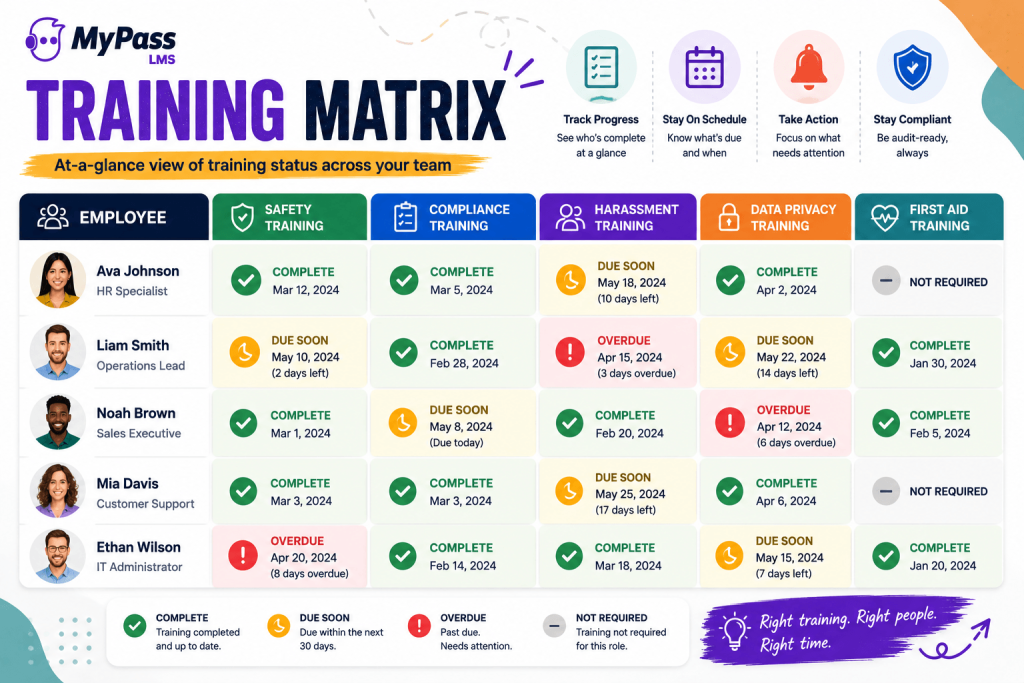
A training matrix puts employees in rows and required trainings in columns, with the renewal interval in each column header. Every cell holds a status code plus the date that matters for that status. Here is a filled-in example for a small operations team, as of October 20, 2026:
| Employee | Role | Harassment prevention (annual) | Bloodborne pathogens (annual) | Forklift evaluation (3 years) | Data privacy (annual) |
|---|---|---|---|---|---|
| J. Rivera | Warehouse lead | C, exp 2027-02-10 | N/A | C, exp 2028-05-02 | C, exp 2027-01-15 |
| K. Okafor | Forklift operator | X, expired 2026-09-30 | N/A | D, exp 2026-11-18 | C, exp 2027-04-01 |
| M. Haddad | Custodian | C, exp 2027-06-20 | D, exp 2026-12-05 | N/A | C, exp 2027-06-20 |
| L. Brooks | Office coordinator | C, exp 2027-08-11 | N/A | N/A | IP, due 2026-10-31 |
| T. Nguyen | Custodian (started 2026-10-06) | IP, due 2026-11-05 | O, due 2026-10-06 | N/A | A, due 2026-11-05 |
Read across a row and you see one person's gaps; read down a column and you see one training's risk. In this example, K. Okafor's harassment training has lapsed and needs scheduling this week. T. Nguyen is the bigger problem: OSHA requires bloodborne pathogens training "at the time of initial assignment" to tasks with exposure risk (1910.1030(g)(2)(ii)), so that custodian should not be cleaning up spills until the cell turns green.
| Code | Meaning | Rule | Color |
|---|---|---|---|
| C | Complete and current | Expiry more than 60 days away | Green |
| D | Due soon | Expiry within the next 60 days | Amber |
| X | Expired | Was complete, expiry date has passed | Red |
| O | Overdue | First-time training not done by its due date | Red |
| IP | In progress | Started, not finished, still before due date | Light blue |
| A | Assigned | Assigned, not started, still before due date | White |
| N/A | Not required | Training does not apply to this role | Gray |
Tip
Let formulas set the status so nobody types colors by hand. In the log, calculate expiry with =EDATE(CompletionDate, 12) for annual training or =EDATE(CompletionDate, 36) for a three-year cycle. Then set status with =IF(Expiry="", "A", IF(Expiry<TODAY(), "X", IF(Expiry-TODAY()<=60, "D", "C"))) and apply conditional formatting rules on the letter. Build the matrix with a pivot table or XLOOKUP that pulls the latest completion per employee and training.
Spreadsheet vs HRIS vs LMS: three ways to track training
The real difference between the three methods is where the completion record comes from. In a spreadsheet, a person types it. In most HRIS training modules, HR enters it or imports it from somewhere else. In an LMS, the record is created by the training itself when the learner passes the course or the instructor marks attendance.
| Criterion | Spreadsheet (Excel, Google Sheets) | HRIS training module | LMS |
|---|---|---|---|
| Cost to start | Free | Often an add-on to a system you already pay for | Free self-hosted options up to paid hosted plans |
| How completions are recorded | Typed by an admin | Entered by HR or imported | Automatically when a course or assessment is passed; attendance for live sessions |
| Delivers the training | No | Rarely, varies by vendor | Yes: courses, quizzes, live session scheduling |
| Expiry reminders | Manual, or conditional formatting someone has to check | Varies by vendor | Automatic emails before expiry, re-enrollment |
| Audit evidence | Stored separately in folders | Attached to the employee file | Certificate, score and attempt history on the record |
| Best fit | Under about 25 people, few required trainings, nothing that expires | Training delivered elsewhere, HR wants it on the employee profile | Training that is mandatory, recurring or delivered online |
When a spreadsheet stops working
A spreadsheet does not break all at once. It drifts: one completion entered late, one sheet copied and edited offline, one expiry date calculated by hand. Move off it as soon as any of these is true:
- You track at least one certification that expires and a lapse has a safety, legal or contract consequence.
- More than one person updates the file, or managers keep their own copies.
- Required trainings differ by role or site, so the matrix has more N/A cells than real ones.
- Producing proof for one training (who needed it, who completed it, the evidence) takes you longer than an hour.
Key point
A quick rule of thumb from running training programs (not a published benchmark): multiply employees by required trainings. Under about 100 cells with nothing expiring, a spreadsheet is fine. Past about 250 cells, or with any regulated recertification, an admin ends up spending hours each month maintaining the file instead of chasing completions.
How to handle expiring certifications and recertification reminders
Expiring training is where tracking fails most often, because the date that matters is months or years after the completion date that got recorded. Three decisions keep it under control.
1. Give each training the right expiry rule
- Rolling interval: expires a fixed period after completion. Bloodborne pathogens refresher training must happen "at least annually" (1910.1030(g)(2)(ii)), so set it to 12 months from completion.
- Calendar deadline: everyone must complete by the same date, for example annual policy acknowledgment by December 31. Simpler to manage, but it creates a December rush.
- Event-triggered: the requirement resets because something happened. Forklift operators need an evaluation at least once every three years, and refresher training sooner if they are involved in an accident or near miss, are seen operating unsafely, or are assigned a different type of truck (1910.178(l)(4)). Add a column for the trigger so the record explains why the date moved.
2. Use a reminder schedule with escalation
- 60 days before expiry: re-enroll the employee and send the first notice with the course link or session dates.
- 30 days before: second notice, copy the manager.
- 7 days before: final notice to employee and manager; book a live session seat if the training is instructor-led.
- Day of expiry: status flips to X, the compliance owner is notified, and the manager confirms in writing whether the person is pulled from the task.
3. Write down the recertification rules
Decide whether an early renewal runs from the completion date or from the old expiry date. Calculating from the old expiry stops dates creeping earlier every year; calculating from completion is easier to explain. Pick one and apply it everywhere. Never overwrite the previous completion: add a new row so the history shows the person was continuously current. If you are mapping all of these dates across a year, a compliance training calendar keeps renewals from piling up in the same month.
In MyPass LMS
In MyPass LMS, the Compliance Hub tracks compliance by program and sends expiration alerts before a requirement lapses. eLearning completions are recorded the moment the learner finishes, live sessions are marked through the Attendance Sheet, and a certificate is issued on completion. Groups let you organize people by role or site, so role-based requirements follow the person instead of living in a spreadsheet column.
Audit readiness: what to have ready before anyone asks
Auditors, insurers and client compliance teams rarely ask "do you train people?" They ask for a specific population, a specific training and a specific date, then pick a few names and ask for the evidence behind each one.
Example
Request: "List every forklift operator at Warehouse 2 and show that each was evaluated within the last three years." A good answer is one export with name, ID, role, evaluation date, evaluator and expiry, plus the signed evaluation or certificate for any name the auditor picks. A bad answer is "let me check with the site manager."
To answer requests like that in minutes, keep these items for every required training:
- The requirement itself: which roles need it, how often, and the regulation, contract or policy behind it.
- A roster that can be filtered by role, site and date, including people who have left (their records still count during the retention period).
- Per-person evidence: certificate, quiz score, or signed attendance sheet for live sessions. Digital sign-in, such as QR code attendance tracking, saves scanning paper later.
- The content version and the trainer's name and qualifications for each session.
- A retention rule per training. OSHA's three-year rule for bloodborne pathogens training records is one example; check each regulation that applies to you and keep records for the longest one.
Then run a 15-minute self-audit once a month: pick five random cells marked C, trace each to its evidence, and fix anything you cannot prove. Treat a completion without evidence as incomplete. If audit preparation is a recurring headache, see how a dedicated compliance training setup handles assignment, reminders and reporting in one place.
Free training tracking options and their hidden costs
Free tracking exists at every level; what changes is who pays in time.
- Free spreadsheet template: use the log, matrix and formulas above. Cost: an admin's time every week, and the risk that the file is wrong when it matters.
- The HRIS you already have: check if your plan includes a training or certification module before buying anything. Cost: completions still need to be entered, because the HRIS usually does not deliver the training.
- A free, self-hosted LMS: delivers and records training in one place with no license fee. Cost: you run the server, backups and updates. Compare options with this guide on how to choose a free LMS.
In MyPass LMS
MyPass Community Edition is free and self-hosted, with unlimited registered users, certificates and renewals, and reporting included. Dynamic Reports and Export to Excel give you the roster an auditor asks for without rebuilding a spreadsheet. If you would rather not run a server, the hosted plans on the pricing page start with a 15-day free trial and no credit card.
Set up employee training tracking in seven steps
- List every required training with its source (regulation, client contract, internal policy) and its expiry rule: one-time, rolling interval, calendar deadline or event-triggered.
- Map trainings to roles, not people. A role-by-training table is far easier to maintain than individual assignments, and new hires inherit the right requirements on day one.
- Pull the employee list from HR with ID, role, site, manager and hire date, so the tracker matches payroll headcount.
- Backfill current status from evidence. Enter a completion only if you have a certificate, score or signed sheet for it; otherwise mark it A and assign it.
- Set due dates for new hires, for example within 30 days of start, and before the first exposure for safety training that must precede the task.
- Turn on the reminder schedule (60, 30 and 7 days, then escalation) and name one owner for overdue and expired cells.
- Run your first self-audit within a month, then repeat monthly and review the requirement list each year or whenever a regulation, contract or role changes.
Frequently asked questions
What should an employee training tracker include?
At minimum: employee ID and name, job role, site and manager, training title and version, requirement source, assigned and due dates, completion date, score or result, trainer or evaluator, expiry date, a link to evidence such as a certificate or attendance sheet, and a status. Keep one row per completion so you retain history when people recertify.
How do I create a training matrix in Excel?
Keep a training log with one row per completion, calculate expiry with EDATE (for example 12 months after completion), and set a status code with an IF formula comparing the expiry date to TODAY. Then build the matrix with a pivot table or XLOOKUP, employees in rows and trainings in columns, and color the cells with conditional formatting based on the status code.
Is there free training tracking software?
Yes. A spreadsheet template costs nothing but relies on manual updates. Many HRIS plans include a basic training module. Free self-hosted LMS platforms, such as MyPass Community Edition, both deliver training and record completions automatically, with no license fee; the trade-off is that you run and maintain the server yourself.
How long should you keep employee training records?
It depends on the rule that requires the training. OSHA's bloodborne pathogens standard, for example, requires training records to be kept for three years from the date of training. Check every regulation, contract and policy that applies to you, keep records for the longest required period, and keep records for former employees too.
How do you track certification expiration dates?
Give every training an expiry rule (rolling interval, calendar deadline or event-triggered), calculate the expiry date from the completion date, and drive status from that date. Send reminders at 60, 30 and 7 days before expiry, copy the manager from 30 days, and escalate to the compliance owner on the day it lapses.
Tracking this in a spreadsheet stops scaling somewhere around fifty people. See how MyPass automates it — automatic enrolment, renewal reminders and audit-ready records.
Keep reading

Tracking & ROI
QR Code Attendance Tracking for Training Sessions
Course design & delivery
Built-In SCORM Authoring: Create Courses Without a Separate Tool

Choosing an LMS