
Best LMS for Retail and Frontline Teams in 2026 (10 Compared)
The best LMS for retail and frontline teams in 2026: 10 platforms compared on phone-first training, store reporting, compliance and turnover-proof pricing.
On this page 8 sections
- Retail and frontline LMS comparison table (2026)
- The 10 platforms: fit, frontline features, price and caveats
- Six retail constraints to test before you buy
- What turnover does to your LMS bill: a worked example
- A weighted scorecard for a retail LMS
- Questions to ask retail LMS vendors
- The 48-hour new-hire test for every finalist
- Frequently asked questions
Short answer
The best LMS for retail and frontline teams gets a new hire without a company email training on a phone on day one, reports completion by store and district, and does not charge you again every time someone quits. Platforms worth shortlisting in 2026: 7taps, Axonify, Docebo, eloomi, iSpring LMS, Litmos, Mitti, MyPass LMS, TalentLMS and Trainual.
Picking the best LMS for retail and frontline teams is a test of how a platform behaves under store conditions: no laptops, no inboxes, no time at a desk. In August 2026, BLS JOLTS data put the monthly quits rate in retail trade at 3.0% of employment, against 2.1% across all private industry, and that is before the holiday intake lands on top.
Two disclosures. We make MyPass LMS, one of the ten platforms below, and we have described it with the same caveat-first approach as the others. Every third-party fact comes from the vendor's own website as checked in October 2026 and is linked so you can verify it. Platforms are listed alphabetically, not ranked.
Retail and frontline LMS comparison table (2026)
"Frontline delivery" lists only what each vendor states publicly. A missing capability may still exist; ask to see it live.
| Platform | Best fit | Frontline delivery (vendor-stated) | Pricing |
|---|---|---|---|
| 7taps | Reaching staff who have no work email or app | Text, WhatsApp, QR code or shared tablet; nothing to download | Quote, by audience size |
| Axonify | Large retail and grocery chains wanting training, messaging and store tasks in one app | Company or personal phones; microlearning, broadcasts, task tracking (Premium) | Quote; Core, Pro, Premium tiers |
| Docebo | Large chains and franchises with an L&D team | Mobile learning on both tiers; branded app may be an add-on | Quote; priced by active users, 1-year minimum |
| eloomi | Retailers already running Dayforce HCM | iOS and Android app, Microsoft Teams | Quote |
| iSpring LMS | Mid-size retailers building their own courses | Native mobile app with offline courses | Published: from $3.97 to $6.91 per user/month |
| Litmos | Mid-size and large retailers wanting a mainstream LMS | Mobile delivery listed | Published starting points: $8K and $15K per year |
| Mitti (SafetyCulture) | Stores already running inspections and checklists | Mobile-first lessons, offline, 100+ languages | Published: free to 10 seats; $24 per seat/month annually |
| MyPass LMS | Multi-site retailers needing training records with flat pricing | Mobile-friendly courses, QR attendance for in-store sessions | Published: $0 self-hosted, $99/mo, $319/mo; unlimited registered users |
| TalentLMS | Small and mid-size retailers that want to start this week | Separate TalentCards mobile app | Published: free to 5 users; from $119/mo, by monthly logins |
| Trainual | Owner-run chains documenting how each job is done | iOS and Android app | Quote; $1,000 implementation fee |
The 10 platforms: fit, frontline features, price and caveats
1. 7taps
- Who it suits: Retailers whose biggest problem is reach. The 7taps homepage calls it a microlearning platform "that reaches the people your LMS can't", positioned alongside an LMS rather than replacing it.
- Frontline features: Lessons arrive by text, WhatsApp, QR code or a shared tablet, open with nothing to download and take about five minutes. Completion can be tracked by name without the learner creating an account.
- Pricing: Quote-based. The pricing page prices by audience size, with bands from under 500 to 25,000+ people.
- Caveat: It is a delivery layer, not a system of record. SCORM is not mentioned, so ask how completions get into the LMS or HR system your auditors will look at.
2. Axonify
- Who it suits: Large retail and grocery chains that want training, store communications and task execution in one frontline app. Retail and grocery are both named industries on the Axonify retail page.
- Frontline features: Adaptive microlearning that runs on company devices or employees' own phones, real-time completion and knowledge data for managers, and "Guided Execution" that pushes launches, promotions and loss-prevention procedures to every store as tasks.
- Pricing: Quote-based. The pricing page describes three tiers (Core, Pro, Premium), priced on team size, locations and features. Task tracking across locations is in Premium; enterprise data integrations are add-ons. Axonify says implementation typically takes as little as 8 weeks.
- Caveat: Quote-only pricing and an eight-week rollout suit large chains more than a 10-store operator.
3. Docebo
- Who it suits: National chains and franchise systems with a dedicated L&D team that also train partners or customers. Its pricing page cites Denny's and Burger King as examples of consistent multi-location training.
- Frontline features: Mobile learning is included in both tiers. The branded mobile app appears in one tier's feature list and as an add-on elsewhere on the same page, so confirm which applies.
- Pricing: Quote-based, by tier and user model: monthly active, yearly active or registered active users. Minimum contract is one year, and Docebo says it is best suited to organizations training 250+ learners. An overage mechanism covers short spikes.
- Caveat: Needs an administrator. Ask how a November seasonal spike is billed under each user model.
4. eloomi
- Who it suits: Retailers already using Dayforce for HR and payroll. The eloomi homepage says it can be bought standalone or integrated into Dayforce's HCM platform, and lists retail and frontline workers among its solutions.
- Frontline features: Android and iOS app, Microsoft Teams access and a third-party course library sold in content plans.
- Pricing: Quote-based; nothing published.
- Caveat: Little public detail on frontline login or store reporting; the Dayforce link is the main reason to shortlist it.
5. iSpring LMS (iSpring Learn)
- Who it suits: Mid-size retailers that build their own courses and want authoring from the same vendor.
- Frontline features: The iSpring retail page describes a native mobile app that works "even offline," role-based learning paths and compliance tracking across locations. It offers a 30-day free trial.
- Pricing: Published. The pricing page lists Business tiers of $6.91 per user/month at 100 users ($8,286 a year), $4.46 at 300 and $3.97 at 500.
- Caveat: Per-user bands mean seasonal spikes push you toward the next band. Ask how leavers free up a seat.
6. Litmos
- Who it suits: Mid-size and large retailers that want a mainstream corporate LMS.
- Frontline features: Mobile delivery is listed under learning delivery. Premium and partner content libraries are add-ons on every plan.
- Pricing: The Litmos pricing page lists Foundation starting at $8K per year and Platinum starting at $15K per year; Platinum AI is quote-only.
- Caveat: The page does not say how users are counted; get that in writing, plus the content library cost.
7. Mitti by SafetyCulture (formerly EdApp)
- Who it suits: Stores that already run inspections and checklists and want training in the same app. EdApp was retired on March 31, 2026, with its training features moved into SafetyCulture, which now brands the platform Mitti. Older lists that name EdApp mean this product.
- Frontline features: Bite-sized, mobile-first lessons, offline completion that syncs later, 1,000+ free editable courses, AI course drafting, one-click translation into 100+ languages and recurring courses that reissue themselves.
- Pricing: Published. The Mitti pricing page lists Free for up to 10 seats, Premium at $24 per seat/month billed annually ($29 monthly) and custom Enterprise pricing.
- Caveat: Per-seat pricing; model the bill at peak seasonal headcount, not your average.
8. MyPass LMS (Kprise)
- Who it suits: Multi-site retailers that need compliance-grade records and a bill that stays flat through turnover. Kprise, based in Bethesda, Maryland, has built training software since 2010, and MyPass is used by 130+ organizations in 11 countries.
- Frontline features: A mobile-friendly learner experience, learning paths, groups for stores and districts, automatic assignment by role and location, QR attendance for in-store sessions, certificates, a Corporate Compliance course pack (harassment prevention, workplace safety, code of conduct), a translation tool and reports that export to Excel. Details are on the MyPass LMS retail page.
- Pricing: Published. Community Edition is $0 and self-hosted; Shared Hosting is $99/mo ($79/mo annually) with up to 50 simultaneous logins; Private Hosting is $319/mo ($249/mo annually) with up to 1,000; Enterprise is custom. Every plan includes unlimited registered users.
- Caveat: No text-message delivery or phone-number login is listed, so staff without email need accounts you create for them. There are no native POS or workforce-scheduling integrations (HR sync covers BambooHR, Sage HR and TalentHR, plus the REST API), no offline mode is listed, and there are no store messaging or task tools like Axonify's. The off-the-shelf library has no food handler course. Plans cap simultaneous logins, so size for shift-start peaks.
9. TalentLMS
- Who it suits: Small and mid-size retailers that want to set up without IT. The TalentLMS homepage quotes a retail customer who had it running with about 10 courses within a week.
- Frontline features: TalentLibrary with 1,000+ courses (soft skills, leadership, compliance) and TalentCards, a mobile training app sold as a separate product.
- Pricing: Published. The pricing page lists Free (5 users, 10 courses), Core from $119/month, Grow from $229 and Pro from $449, with 20% off for annual billing. Pricing is based on unique users who log in each month.
- Caveat: Monthly-login pricing means you pay most in the months you onboard most.
10. Trainual
- Who it suits: Owner-run chains that first need to document opening, closing, cash handling and merchandising.
- Frontline features: Policies, processes and quizzes in an iOS and Android app with assignment notifications.
- Pricing: The Trainual pricing page lists no prices; plans vary by team size and features, and there is a one-time $1,000 implementation fee. It says it is best suited to companies with 25 to 1,000 employees.
- Caveat: An SOP tool more than a compliance LMS; ask how it records state-mandated training.
Key point
Most "best retail LMS" lists that rank on Google are written by a vendor that puts itself first, including the company publishing this one. Use any list, ours included, as a starting set of names. The 48-hour new-hire test further down is what separates them.
Six retail constraints to test before you buy
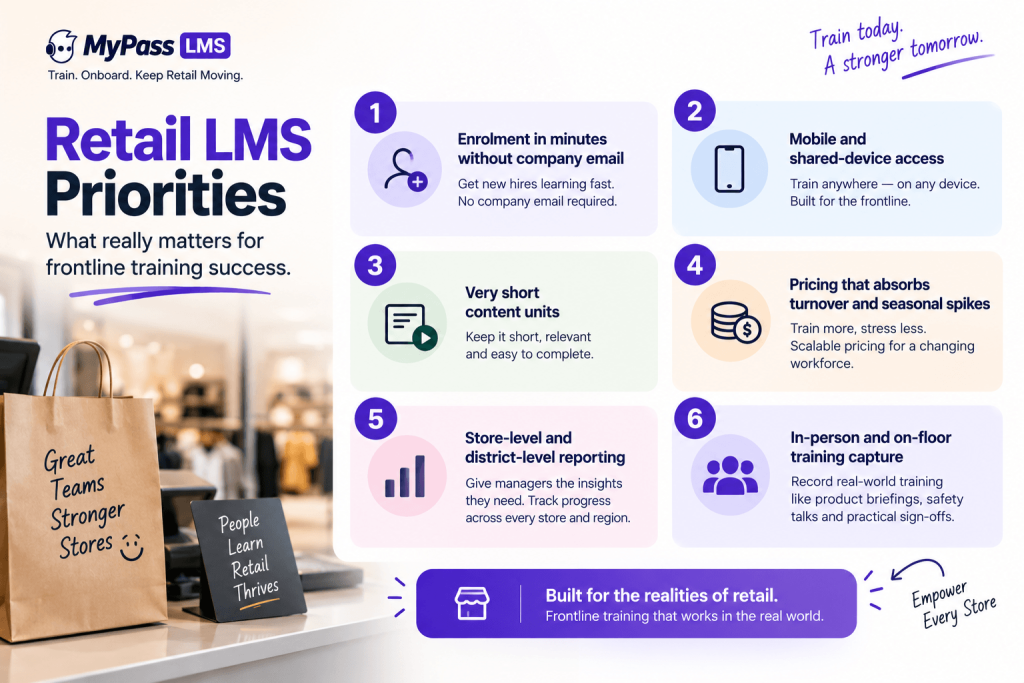
Turnover and seasonal hiring
At a 3.0% monthly quits rate, a store of 25 loses roughly nine people a year and has to train their replacements, then adds a seasonal wave on top. Enrollment has to be automatic: a new hire lands in the right store group and learning path on their start date without anyone remembering. Our guide to onboarding seasonal workers covers the week-one plan for that wave.
Staff without company email
Many associates never get a work inbox. Ask which login routes exist (username and PIN, phone number, QR code, SSO through your HR app) and who resets a password at 6 a.m. on a Saturday. Email-only platforms push managers into shared logins, which destroys your training record.
Phone-first microlearning
Training happens on a personal phone in the break room or a shared tablet at the service desk. Keep modules to three to seven minutes with one task each, such as processing a return. Test the player on a mid-range Android phone over store Wi-Fi. Our post on microlearning for frontline workers has module templates.
Reporting by store and district
A district manager needs their eight stores, each store's overdue items and the named associates behind them, not a company-wide percentage. Check that managers see only their own stores.
Shift scheduling and paid training time
Under the federal rule in 29 CFR 785.27, training time can be left unpaid only if all four conditions hold: it is outside regular hours, truly voluntary, not directly related to the job and involves no productive work. Required store training fails that test, so it is paid time. Schedule it as a labeled block in the rota, for example 20 minutes at the start of a quiet weekday shift, and do not let associates complete mandatory modules at home off the clock.
Compliance deadlines that start on day one
Several mandates are timed from the hire date, which is why they collide with seasonal hiring:
- Harassment prevention (California): employers with 5 or more employees must give non-supervisors 1 hour and supervisors 2 hours. The Civil Rights Department FAQ says seasonal and temporary employees hired for less than six months must be trained within 30 calendar days or 100 hours worked, whichever comes first. Other states differ; see our harassment training requirements by state.
- Food safety (California): food handlers must obtain a card within 30 days of hire, and since January 1, 2024 SB 476 makes employers pay for the course, the exam and the time spent on both. Grocery stores are exempt, but a separately owned food counter inside one is not.
Map each requirement to a role and state in the LMS so the assignment, due date and reminder are created automatically at hire. More frontline delivery patterns are in how to train deskless workers.
What turnover does to your LMS bill: a worked example
Take a chain of 40 stores with 25 associates each, 1,000 people at any moment. At 3.0% monthly quits, about 360 leave and are replaced in a year. Add 300 seasonal hires for November and December. That is roughly 1,660 people who need training in a year, and 1,300 on payroll at the December peak. The same workforce produces very different bills depending on how the vendor counts:
- Per seat: you pay for 1,300 seats at peak if seats can be reassigned from leavers, and closer to 1,660 if they cannot. Ask which.
- Per user band: the 300 seasonal hires can push you into the next band for the whole contract year.
- Monthly active users: the bill rises in exactly the months you onboard most.
- Unlimited registered users with a concurrency cap: headcount does not matter; peak simultaneous logins do, such as the 7 a.m. shift start across 40 stores.
In MyPass LMS
MyPass LMS uses the last model: every plan has unlimited registered users, so you can enroll a seasonal hire on day one and keep their record after they leave without paying for the account. What you size is simultaneous logins: 50 on Shared Hosting, 1,000 on Private Hosting. The MyPass pricing page lists each plan, including a 15-day free trial with no credit card.
A weighted scorecard for a retail LMS
Score each finalist from 1 to 5 per criterion, multiply by the weight and add up. Agree the weights with operations, HR and a district manager before the first demo.
| Criterion | Weight | What a 5 looks like |
|---|---|---|
| Day-one enrollment without email | 20% | New hire is enrolled automatically by store and role and can log in on a personal phone without a work inbox |
| Phone-first learner experience | 20% | Five-minute modules play cleanly on a mid-range Android phone; offline or low-bandwidth mode |
| Store and district reporting | 15% | Managers see only their stores, with named overdue associates, and can export the list |
| Compliance assignment and records | 15% | Assignments by state and role with due dates from the hire date, reminders, certificates and audit export |
| Cost under turnover | 15% | Three-year cost you can calculate at peak headcount, with no charge for accounts of leavers |
| Admin and manager workload | 10% | A store manager can record an in-store session and an HR coordinator can publish a course without the vendor |
| Vendor fit and support | 5% | Named support contact, support hours that cover weekend shifts, written roadmap |
Example
Platform A scores 5 on enrollment without email and 3 on cost under turnover; Platform B scores 3 and 5. On those two lines A gets 1.00 + 0.45 = 1.45 and B gets 0.60 + 0.75 = 1.35. A narrowly wins, because staff who cannot log in never generate a training record at any price. If B can fix enrollment with a username-and-PIN option, B wins.
Questions to ask retail LMS vendors
Send these in writing before the demo. Our list of 15 questions to ask every LMS vendor covers contracts and security; these are the retail-specific ones.
- Which login methods work for an associate with no email address, and who resets their password?
- Exactly how is a billable user counted, and what happens to the bill when 300 seasonal hires start in November?
- Does a leaver's account still count, and do we keep their completion records if we deactivate it?
- Can assignments be triggered by store, role and state from the hire date, with due dates calculated per rule?
- Which HRIS, scheduling or POS systems do you integrate with natively, and which need custom work?
- Which features in the demo are add-ons, and what is our three-year total at peak headcount?
The 48-hour new-hire test for every finalist
Polished demos assume a salaried employee with a laptop. Ask every finalist to run this live in a trial workspace:
- Create a seasonal associate with no email address, assigned to Store 14 in California.
- Have that associate log in on a personal Android phone and finish a five-minute module.
- Confirm harassment prevention was assigned automatically with a due date 30 days out.
- As the store manager, record attendance for a 10-minute safety huddle on the floor.
- As the district manager, pull a report showing that associate and every overdue item across your stores, then export it.
Tip
Run step 2 yourself on your own phone, on the store's guest Wi-Fi, during the demo. Any step the vendor wants to "follow up on" goes in your risk column.
Frequently asked questions
What is the best LMS for retail employees?
It depends on your size and what you need beyond training. Axonify and Mitti combine training with store communications or operations. Docebo and Litmos suit large chains with an L&D team. TalentLMS, iSpring LMS and MyPass LMS publish prices that smaller retailers can check. 7taps reaches staff by text without an account. Shortlist three, then run the same 48-hour new-hire test on each.
Can retail staff without a company email use an LMS?
Yes, but only if the platform supports another login route, such as a username and PIN, a phone number, a QR code, a text-message link or single sign-on through your HR app. Many platforms assume one email per learner, so ask each vendor to show an associate with no email logging in on a personal phone during the demo, not just describe it.
Do retail employees have to be paid for training time?
Usually, yes. Under the federal rule in 29 CFR 785.27, training can be unpaid only if it is outside regular hours, voluntary, not directly related to the job and involves no productive work. Required store training fails that test. In California, SB 476 also requires employers to pay for food handler card training, the exam and the time spent on both.
How quickly must seasonal retail hires be trained in California?
For harassment prevention, California's Civil Rights Department says employers with 5 or more employees must train seasonal and temporary employees hired for less than six months within 30 calendar days or 100 hours worked, whichever comes first. Regular new hires have six months. Food handlers need a food handler card within 30 days of hire.
How much does a retail LMS cost?
Published prices vary widely. iSpring lists $3.97 to $6.91 per user per month, Mitti lists $24 per seat per month billed annually, TalentLMS starts at $119 per month, Litmos starts at $8K per year, and MyPass LMS lists $99 and $319 per month with unlimited registered users. Axonify, Docebo, eloomi, 7taps and Trainual quote individually. Compare three-year totals at peak seasonal headcount.
Keep reading
Course design & delivery
Microlearning for Frontline and Shift Workers: Training That Fits
Course design & delivery
Mobile Learning: Training That Reaches Frontline and Field Teams
Choosing an LMS
Best LMS for Government and Public Sector Organizations
Associations & CE