
LMS Migration: How to Switch Platforms Without Losing Your Data
LMS migration checklist: how to move content, users, completion records and integrations to a new platform without losing data, with a realistic timeline.
On this page 8 sections
An LMS migration moves four separate things: content, people, historical records and integrations. Records and integrations are where migrations fail, because content and accounts transfer relatively mechanically. Audit before you move anything, migrate users first, then content, then completion records, and keep the old system read-only until everything reconciles.
Migrations fail at planning, not at technology
Brandon Hall Group research consistently finds that more than 40 percent of LMS implementations run over budget or over timeline, and data migration is the single most cited root cause. That is worth sitting with, because it means the risk in switching platforms is rarely the software. It is the plan.
The failures are predictable: corrupted completion records, missing user profiles, SCORM packages that will not launch in the new environment, and integrations nobody remembered until they broke. All of them surface in testing because they were not identified in the audit.
This guide covers what you are actually moving, what will not move cleanly, and the sequence that keeps a migration boring.
The four things you are moving
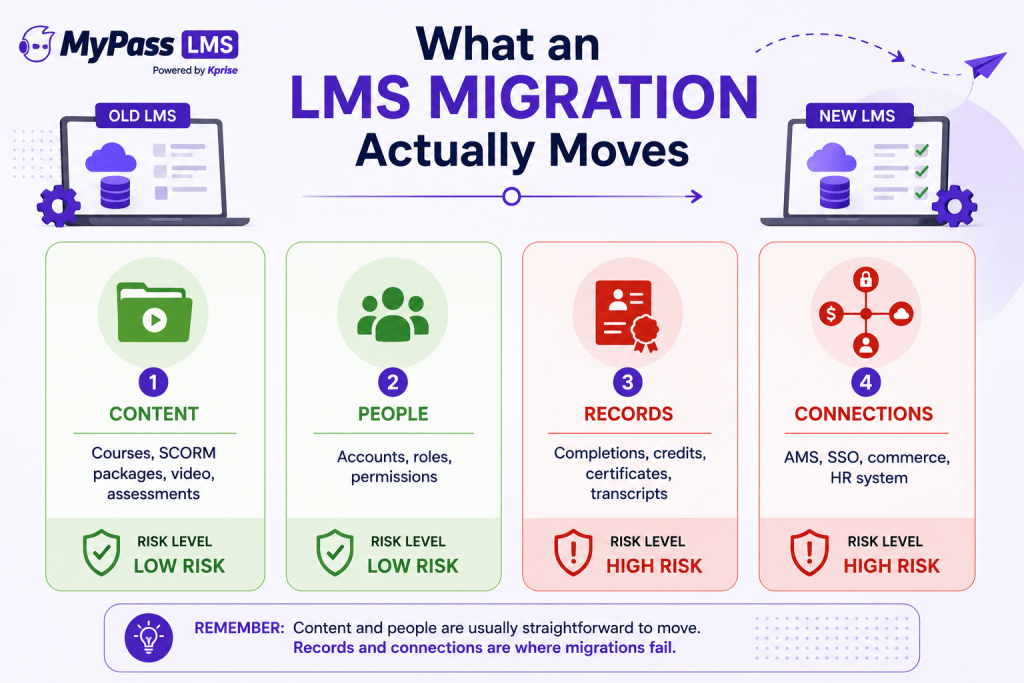
- Content. Courses, SCORM packages, video, assessments. Mostly mechanical, with caveats below.
- People. Accounts, roles, permissions, group structures. Usually straightforward via export and import.
- Records. Completions, certifications, continuing education credits, transcripts, assessment results. This is the high-risk category and the reason migrations fail quietly.
- Connections. AMS or HR system integration, single sign-on, payment processing, reporting feeds. These have to be rebuilt, not moved, and they are routinely forgotten in scoping.
Key point
Get the content across but lose the records or break the integrations, and you have not migrated. You have relocated the easy half. The records are the part an auditor asks for and the part you cannot recreate.
Audit first: you probably should not move most of it
The instinct is to move everything. Resist it. Most learning platforms accumulate somewhere between 50 and 80 percent obsolete content over five or more years, and a pre-migration audit typically reduces migration scope by 20 to 40 percent.
- Content: which courses were actually used in the last 18 months? Retire the rest rather than paying to move it.
- Records: employees still with the organization almost certainly need their history. Leavers from three years ago may not, depending on your retention obligations.
- Compliance records: check with legal or compliance before deciding anything. In regulated industries historical records may be required, and this is not the place to guess.
- Configuration: rules, categories and permissions that accreted over years are usually simpler to rebuild cleanly than to replicate.
Migration is the only realistic opportunity you will get to clear this out, and doing it reduces cost, timeline and risk simultaneously.
What will not transfer cleanly
Being clear about this upfront prevents the most common unpleasant surprise.
- SCORM interaction data. You can generally preserve completion status, final score and completion date. The granular interaction detail, meaning individual question responses within a package, typically does not survive a move between platforms. Plan for that limitation rather than discovering it.
- Old SCORM packages. SCORM 1.2 and 2004 are broadly portable, but older packages sometimes carry dependencies on the authoring tool or the original LMS player, which produce rendering failures in a new environment.
- Manifest identifiers. Re-uploading a package whose manifest item identifiers differ from the original can cause a platform to discard tracking data for identifiers it no longer recognises. Validate manifests before uploading over anything.
- Proprietary content built in the old platform's native authoring tool. This often has to be rebuilt from source files rather than exported, so identify it early because it drives the timeline.
- Historical completions in bulk. Many platforms have no native API for importing historical completion records, so the route is usually a CSV batch import of pre-completed registrations. Confirm the target platform supports this before signing.
The sequence that works
- Audit and scope. Decide what moves, what archives and what gets rebuilt. Confirm retention obligations with compliance.
- Confirm technical compatibility before moving anything: SCORM versions supported, SSO standard such as SAML 2.0, OAuth 2.0 or LDAP, and whether historical completions can be imported at all.
- Migrate users first. Content and records both attach to accounts, so accounts have to exist and be correct before anything else lands.
- Migrate content second, then validate that packages actually launch and track, rather than that they merely uploaded.
- Migrate completion records third, with explicit rules for the edge cases: multiple attempts, expired completions, records for leavers, and completions that predate a course version change.
- Rebuild integrations and test them under realistic conditions.
- Pilot with a representative group of at least 30 learners. Five people will not surface the edge cases that appear in production.
- Run in parallel. Keep the old system live while the new one is validated, then read-only after cutover.
Key point
Keep the legacy system in read-only mode for at least 90 days after cutover, and around 12 months if you are in a regulated industry. Decommission only after a period of stable operation and explicit compliance sign-off on record accuracy.
A realistic timeline and how to protect yourself
For mid-sized organizations of roughly 1,000 to 10,000 users, three to six months is a realistic end-to-end timeline. Smaller associations with modest catalogues often complete in a few weeks to a couple of months. Catalogue size, depth of credit history and the number of integrations to rebuild drive the number far more than the software does.
A few protections worth building in:
- Plan for roughly two to three times your initial time estimate. Migrations are consistently underestimated.
- Secure a senior sponsor before starting, or the project stalls whenever IT or HR deprioritise it.
- Insist on a test migration of historical records specifically, and review the output yourself rather than trusting a status report.
- Make migration support an explicit contractual item, including your named point of contact and what happens if records do not reconcile. A vendor treating migration as entirely your problem is telling you what year two of support will feel like.
- Check the exit terms of the platform you are joining. Export formats and data portability matter, because one day you may be doing this again in the other direction.
That last point is worth dwelling on. The reason many organizations are stuck on a platform they dislike is that leaving is painful by design. Open-core platforms sidestep some of this, since a self-hostable edition means your data sits somewhere you control, and moving between self-hosted and managed is a data migration rather than a re-implementation.
The bottom line
LMS migrations fail on planning, not technology. Audit before you move, because most of your old content should not come with you. Sequence it as users, then content, then records, then integrations. Know in advance what will not transfer, particularly SCORM interaction detail and proprietary content. Pilot with at least 30 people, keep the legacy system read-only for 90 days or a year in regulated industries, and get migration support written into the contract.
MyPass LMS supports SCORM 1.2 and 2004, native AMS integration with eight platforms, and unlimited registered users on every plan. Compare the plans, or start a 15-day free trial and test a slice of your catalogue before committing.
Frequently asked questions
How long does an LMS migration take?
For mid-sized organizations of roughly 1,000 to 10,000 users, three to six months end to end is realistic. Smaller organizations with modest catalogues often finish in a few weeks to a couple of months. Catalogue size, depth of historical records and the number of integrations drive the timeline more than the software.
What data does not transfer between LMS platforms?
SCORM interaction detail, meaning individual question-level responses, generally does not survive a move, though completion status, final score and completion date usually do. Proprietary content built in the old platform's native authoring tool often has to be rebuilt from source rather than exported.
What order should I migrate LMS data in?
Users first, since content and records attach to accounts. Then content, validating that packages launch and track rather than simply upload. Then completion records with explicit rules for edge cases. Then rebuild and test integrations. Pilot before full cutover.
How long should I keep the old LMS after migrating?
Keep it in read-only mode for a minimum of 90 days after cutover, and around 12 months if you are in a regulated industry. Decommission only after a period of stable operation on the new platform and explicit compliance sign-off on record accuracy.
Why do LMS migrations fail?
Almost always planning rather than technology. Brandon Hall Group research finds more than 40 percent of LMS implementations overrun, with data migration the most cited cause. Skipping the pre-migration audit means format and record problems surface during testing instead of during scoping.
Should I migrate all my historical training records?
Not necessarily. Employees still with the organization generally need their history, while records for long-departed leavers may not be required, subject to your retention obligations. Confirm with legal or compliance before deciding, particularly in regulated industries where retention is mandatory.
Keep reading
Choosing an LMS
Free LMS or Free Trial? The Five Kinds of Free
Choosing an LMS
Open edX Alternatives: 7 Options Worth Comparing
Choosing an LMS