
Best LMS for Compliance Training in 2026 (9 Platforms Compared)
The best LMS for compliance training in 2026: 9 platforms compared on recertification, audit reports, content libraries and pricing, with weighted criteria.
On this page 8 sections
- Compliance LMS comparison table (2026)
- The 9 platforms: fit, compliance features, price and caveats
- Six capabilities a compliance LMS must get right
- Weighted criteria for scoring compliance LMS finalists
- How compliance LMS pricing models compare
- Questions to ask compliance LMS vendors
- A 30-minute audit drill for every demo
- Frequently asked questions
Short answer
The best LMS for compliance training assigns courses by role and location, enforces due dates, reassigns training before certifications expire, records policy acknowledgments and produces an audit report in minutes. In 2026 the main options are Absorb, Cornerstone, Docebo, iSpring Learn, Litmos, TalentLMS, Vector Solutions and MyPass, with KnowBe4 as a security-and-compliance content platform.
Picking the best LMS for compliance training is less about course topics and more about what happens after a learner clicks Finish. An auditor rarely asks whether a harassment course existed. They ask for proof that a named person completed the current version by a specific date. This guide compares nine platforms on exactly that, then gives you weighted criteria, vendor questions and a demo drill for every finalist.
Two disclosures. We make MyPass LMS, one of the nine platforms below, and we have described it with the same caveat-first approach as the others. Every third-party fact comes from the vendor's own website as checked in October 2026 and is linked inline so you can verify it. Platforms are listed alphabetically, not ranked. Longer write-ups of individual products are in our LMS reviews library.
Compliance LMS comparison table (2026)
"Recertification" means the vendor publicly describes expiring certifications plus automatic reassignment. "Not described" means you have to ask, not that the feature is missing.
| Platform | Best fit | Recertification | Compliance content | Pricing model |
|---|---|---|---|---|
| Absorb LMS | Mid-size and large companies wanting rule-based enrollment | Automated certification and recertification enrollment | Absorb Amplify library | Quote-based |
| Cornerstone | Large, multi-site employers in regulated industries | Renewal tracking; workflow not detailed publicly | Content Subscriptions (separate product) | Quote-based |
| Docebo | Enterprises with 250+ learners and several audiences | Certification expiry and renewal by retaking training | Not detailed publicly | Quote-based, by active users; one-year minimum |
| iSpring Learn | SMBs that want published per-user pricing | Re-enrollment based on certificate validity | iSpring Academy courses preloaded; Go1, Udemy, LinkedIn Learning integrations | Published: from $8,286/yr for 100 users |
| KnowBe4 (Compliance Plus) | Security teams adding compliance topics to phishing training | Automated training campaigns | Large security and compliance library (HIPAA, PCI, GDPR) | Quote-based; Compliance Plus appears as an add-on |
| Litmos | Companies that want a large bought-in content catalog | Automated certification cycles | Premium Content Libraries, add-on on every plan | Published: from $8K/yr |
| MyPass LMS | Small and mid-size organizations wanting flat pricing | Certificates with expiry, Compliance Hub expiration alerts | Corporate Compliance pack (part of a 29-course catalog) | Published: $0 self-hosted, $99/mo, $319/mo, Enterprise custom |
| TalentLMS | Small teams starting from zero | Certificate expiry with reassignment before or at expiry | TalentLibrary, add-on on every plan | Published: free up to 5 users, paid from $119/mo |
| Vector Solutions (Vector LMS) | Public safety, K-12, industrial and construction workforces | Recert tracking described for fire and EMS | Industry-specific catalogs | Quote-based |
One naming note: SAP no longer owns Litmos; SAP agreed in August 2022 to sell Litmos to Francisco Partners, so "SAP Litmos" in older articles refers to the same product.
The 9 platforms: fit, compliance features, price and caveats
1. Absorb LMS
- Who it suits: Organizations with enough HR data to drive enrollment rules, such as department, job code and location fields synced from an HRIS.
- Compliance features: The Absorb compliance training page says you control "which learner characteristics trigger enrollments," can "automate certification and recertification course enrollment workflows," and can monitor completion and compliance status in pre-built and custom reports. Ready-made courses come through the Absorb Amplify library.
- Pricing: Quote-based. The pricing page asks for your learner count and routes you to sales.
- Caveat: Attestations and due-date escalation are not described on the compliance page, and the size of the Amplify compliance catalog is not published. Ask whether Amplify is in your quote or priced separately.
2. Cornerstone
- Who it suits: Large employers in healthcare, life sciences, financial services, manufacturing or the public sector, often with an HR suite already in place.
- Compliance features: The Cornerstone compliance management page says you can "auto-assign required training based on role, location, and policy," send assignments and reminders for deadlines, track renewals and "show auditors real-time proof of compliance." Content is sold through separate Content Suite and Content Subscriptions products.
- Pricing: Quote-based.
- Caveat: Cornerstone now sells a broad workforce platform that also includes the Saba and SumTotal product lines. Make sure your quote names the compliance modules you need rather than the whole suite, and ask for a life-sciences reference if you need electronic signatures on training records.
3. Docebo
- Who it suits: Enterprises that run employee compliance alongside partner or customer training on one platform.
- Compliance features: The Docebo pricing page lists "certification and compliance tracking" in the entry Elevate tier. Docebo's help article on certifications describes expiry periods in days, weeks, months or years, renewal by retaking the same course or learning plan, and "certification has expired" notifications. It also says the redesigned Certifications & Retraining experience becomes a core capability from October 28, 2026.
- Pricing: Quote-based, scaled by monthly, yearly or registered active users. The minimum contract is one year, most customers sign for three to five, and Docebo says it typically suits organizations training 250+ learners.
- Caveat: Advanced Analytics appears both in the Enterprise tier and as a paid add-on, so confirm which audit reports you get on your tier. For a compliance-only program, it can be more platform than you need.
4. iSpring Learn
- Who it suits: Small and mid-size companies that want to know the price before the first call.
- Compliance features: The iSpring Learn page describes an "intelligent reenrollment system" that monitors certificate validity and assigns training in advance, plus preloaded iSpring Academy courses that include compliance and cybersecurity, and integrations with Udemy, Go1 and LinkedIn Learning.
- Pricing: Published. The iSpring Learn pricing page lists the Business plan at $8,286 a year for 100 users, $16,050 for 300 and $23,790 for 500. Enterprise is quote-based.
- Caveat: The public pages do not describe due-date escalation, attestations or the size of the Academy compliance catalog, and pricing is per user, so cost rises in step with headcount.
5. KnowBe4 (Security Awareness Training and Compliance Plus)
- Who it suits: Organizations whose compliance training is driven by the security team: phishing simulations first, HIPAA, PCI and privacy modules second.
- Compliance features: The KnowBe4 homepage cites a library of "1,000+ modules, videos, and games" and says the platform can "automate policy acknowledgment, reporting, and audit-readiness workflows." The Compliance Plus page covers ethics, HR and workplace conduct plus HIPAA, PCI and GDPR, runs automated campaigns, and lets you upload your own SCORM content to the KnowBe4 LMS.
- Pricing: Quote-based. The Compliance Plus pricing link points to the add-ons section of the security awareness pricing page.
- Caveat: It is a security awareness platform with an LMS attached, not a general-purpose LMS. If you also need onboarding, instructor-led safety sessions or job-specific SOP training, you will probably run a second system. Our guide to cybersecurity awareness training for employees explains where that program ends and broader compliance begins.
6. Litmos
- Who it suits: Companies that want to buy most of their compliance content rather than build it.
- Compliance features: The Litmos homepage describes "automated certification cycles" and role-level visibility, and the plans page lists assessments and compliance management.
- Pricing: Published starting points. The Litmos plans page lists Foundation from $8K a year and Platinum from $15K a year; Platinum AI is quote-based.
- Caveat: The Premium Content Libraries ("proprietary specialized compliance and capability development content") are marked as add-ons on every plan, so the starting price does not include the content most buyers choose Litmos for.
7. MyPass LMS (Kprise)
- Who it suits: Small and mid-size organizations that want compliance tracking, a starter course catalog and published, flat pricing. Kprise, based in Bethesda, Maryland, has built training and certification software since 2010; MyPass is used by 130+ organizations in 11 countries.
- Compliance features: Automatic assignment by role and location, reminders, certificates with expiry dates, and a Compliance Hub that shows compliance by program and sends expiration alerts. Dynamic Reports cover completions, user records export to Excel, and QR-code attendance records in-person sessions. The off-the-shelf catalog includes a Corporate Compliance pack covering harassment prevention, code of conduct, anti-bribery, workplace safety, D&I, HIPAA, bloodborne pathogens, and IT security and data privacy. Details are on the MyPass compliance training page.
- Pricing: Published. Community Edition is $0 and self-hosted. Shared Hosting is $99/mo ($79/mo billed annually) with up to 50 simultaneous logins; Private Hosting is $319/mo ($249/mo annually) with up to 1,000; Enterprise is custom. Every plan includes unlimited registered users.
- Caveat: The built-in catalog is 29 courses in total, far smaller than the libraries Litmos, KnowBe4 or Cornerstone sell; for wider topic coverage you would add content through the OpenSesame integration. A dedicated policy-attestation workflow is not among the features Kprise lists, so ask to see how an acknowledgment is recorded. Plans cap simultaneous logins, so size for the week before your annual deadline, not your headcount.
8. TalentLMS
- Who it suits: Small teams that want to start free and grow into a paid plan.
- Compliance features: TalentLMS's help article on using TalentLMS for compliance training describes certificates that expire on a date or after a period, reassignment at expiry or one week or 30 days before it, alerts before expiry, and an exportable Extended Timeline it calls a "complete and unalterable record of all actions."
- Pricing: Published. The TalentLMS pricing page lists Free (up to 5 users), Core from $119/mo, Grow from $229/mo and Pro from $449/mo, priced in user brackets up to 1,000, with 20% off for annual billing. Enterprise starts at 1,000 users and is quote-based.
- Caveat: TalentLibrary, the ready-made course catalog, is an add-on on every plan. Several of the linked help articles on expiry and reassignment are labeled beta, so test them in your trial.
9. Vector Solutions (Vector LMS)
- Who it suits: Fire departments, EMS, law enforcement, K-12 districts, manufacturers and architecture, engineering and construction firms, where training ties directly to licenses and certifications.
- Compliance features: The Vector LMS page describes a system to "assign, track, and report role-based skills and compliance training," with fire-service tracking of "EMS recerts, skill evaluations, ISO, and more," and AEC training to keep staff licensed in "all 50 states for 100+ certifications."
- Pricing: Quote-based.
- Caveat: Its strength is industry-specific content and recordkeeping. If you are an office-based company outside those sectors, much of what you pay for will go unused.
Key point
Most "best compliance LMS" lists that rank on Google are written by a vendor that puts itself first, including the company publishing this one. Use any list as a starting set of names. The audit drill further down is what separates them.
Six capabilities a compliance LMS must get right
Assignment by role, location and hire date
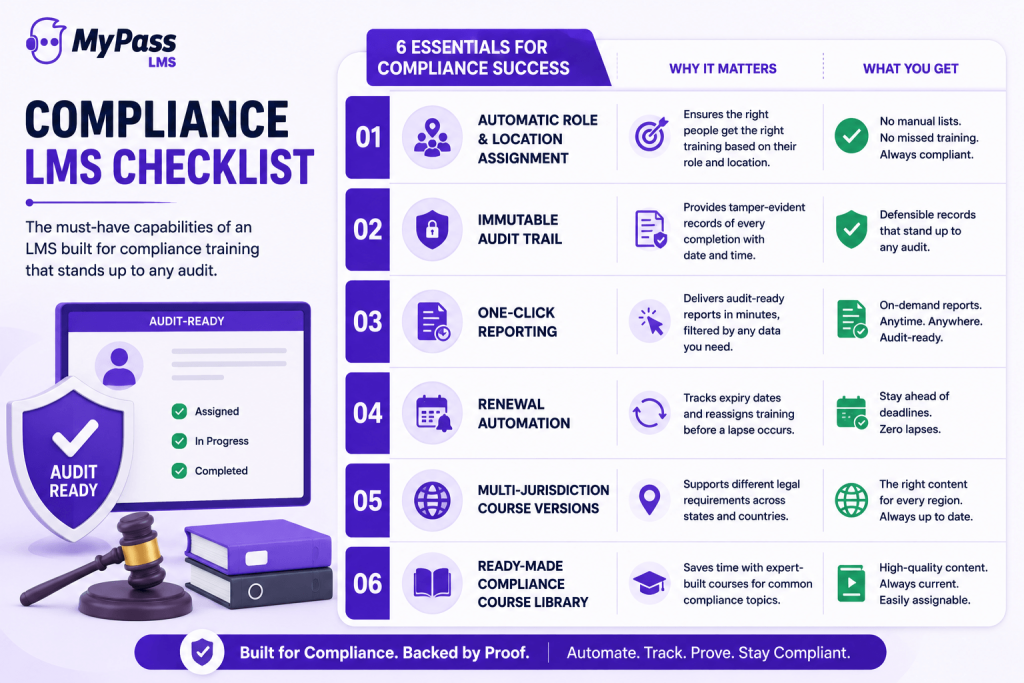
Requirements differ by job and by jurisdiction. A forklift operator in Ohio and a recruiter in New York need different courses, and the LMS should work that out from HR fields rather than from a list someone builds every January. Look for rules that combine at least three fields (job role, work location, hire date) and that re-run automatically when someone transfers or is promoted to supervisor. State harassment rules are the clearest example; our summary of harassment training requirements by state shows how much they vary.
Due dates, reminders and escalation
Every assignment needs a due date relative to an event (30 days after hire, 60 days after promotion, or a fixed annual date), reminders to the learner, and an escalation to the manager once training is overdue. Without escalation, the overdue list lands on the compliance officer, who chases people by email. Plan the year's deadlines first; our guide to building a compliance training calendar walks through spacing them so they do not all fall in one month.
Recertification and expiry
Annual and biennial training is the norm. New York, for example, requires sexual harassment prevention training "at least once per year" and lets employers base the cycle on the calendar year or each employee's start-date anniversary. Your LMS should store an expiry date on each certificate, reassign the course a set number of days before it lapses, and keep the old certificate in the history instead of overwriting it.
Attestations and policy acknowledgment
Some obligations are "read and confirm," not "complete a course": the code of conduct, an updated data-handling policy, a new safety procedure. The same New York page says a signed acknowledgment of the policy is not required but recommends keeping one along with training records. An LMS should be able to record "I have read and understood version 3.2 of this policy" with a date, a name and the policy version, and reassign it when the policy changes.
Audit-ready reports
An audit report needs five fields per learner: name or employee ID, course title and version, completion date, score if there was a test, and certificate expiry. You should be able to filter by location, department or date range and export to CSV or Excel without asking the vendor. Check that records survive when a course is retired or an employee leaves; a deleted course should not take its completion history with it.
A content library you can live with
Writing harassment, HIPAA and safety courses from scratch takes months. Bought-in content saves that time, but it is also where employees switch off; generic, click-next modules are a big reason employees ignore compliance training. Check whether the library is included or an add-on, whether you can edit it to add your own policies, and whether completions from library courses appear in the same reports as your own courses.
Tip
Separate the platform decision from the content decision. A platform that tracks well and imports SCORM can run a third-party library; a large library on a platform with weak expiry and reporting cannot fix the audit problem.
Weighted criteria for scoring compliance LMS finalists
Score each finalist from 1 to 5, multiply by the weight and add up. Agree on the weights with HR, the compliance or risk lead and finance before the first demo.
| Criterion | Weight | What a 5 looks like |
|---|---|---|
| Audit reporting and record retention | 25% | Self-serve report by person, course version and date, exported in under a minute; history kept after course or user deletion |
| Recertification and expiry | 20% | Expiry per certificate, reassignment before lapse, full certificate history |
| Rule-based assignment | 15% | Rules on role, location and hire date from HRIS data, re-run on transfer or promotion |
| Due dates and escalation | 10% | Relative due dates, learner reminders, automatic manager escalation |
| Policy acknowledgment | 10% | Versioned attestations with date and name, reassigned when the policy changes |
| Content coverage and cost | 10% | Library covers your required topics, is editable, and its price is in the quote |
| Three-year total cost | 10% | Calculable from a published price or written quote at today's headcount and 1.5 times it |
Example
Platform A scores 5 on audit reporting and 2 on content; Platform B scores 3 on reporting and 5 on content. With these weights A gets 1.25 + 0.20 = 1.45 on those two lines and B gets 0.75 + 0.50 = 1.25. If the rest is even, A wins: you can buy more content later, but you cannot rebuild missing completion records after an audit request arrives.
How compliance LMS pricing models compare
Compliance training reaches every employee, so per-user pricing bites harder here than for optional learning. The vendors above charge in four ways:
- Per user: iSpring Learn's 500-user plan is $23,790 a year; cost tracks headcount.
- User brackets: TalentLMS prices plans in brackets. Ask for your bracket and the next one up.
- Platform fee plus content: Litmos starts at $8K a year with premium libraries extra. Price the content you will use.
- Flat fee with a concurrency cap: MyPass allows unlimited users but limits simultaneous logins, which matters most in the week before an annual deadline.
For quote-based vendors, ask for a written three-year figure that includes content, implementation and reporting add-ons.
Questions to ask compliance LMS vendors
Send these in writing before the demo. Our list of 15 questions to ask every LMS vendor covers contracts and security; these are the compliance-specific ones.
- Which HR fields can drive assignment rules, and do rules re-run automatically when an employee changes role or location?
- Can due dates be relative to hire date or promotion date, and who is notified when training is overdue?
- When a certificate expires, is the old one kept, and how many days before expiry can reassignment happen?
- How do you record a policy acknowledgment, and does the record include the policy version?
- Can an admin edit or delete a completion record, and if so, is that change logged?
- What happens to completion history when a course is retired or an employee is deactivated?
- Is the compliance content library in this quote, and can we edit its courses to add our own policies?
- Which compliance reports are in our tier, and which are add-ons?
- Can we export every completion and certificate record if we leave, and in what format?
A 30-minute audit drill for every demo
Sales demos show the happy path. Give every finalist the same script and ask them to run it live in a sandbox:
- Create a new hire in New York with the role "Supervisor." Show which courses were assigned automatically and their due dates.
- Move that person to a California location. Show what changed in their assignments without an admin touching them.
- Complete the harassment course and a policy acknowledgment as that learner. Show the certificate and its expiry date.
- Fast-forward or backdate to 30 days before expiry. Show the reassignment and the reminder the learner receives.
- Produce a report of everyone at one location who is overdue or expiring in the next 60 days, and export it.
- Pull the full training history for one named employee for the last three years, as you would for an auditor.
Any step the vendor cannot show live goes in your risk column. A platform that completes all six in 30 minutes is built for compliance, whatever its marketing says.
Frequently asked questions
What is the best LMS for compliance training?
There is no single best LMS for compliance training; it depends on your size, industry and how much content you need to buy. Absorb, Cornerstone and Docebo suit large organizations, Vector Solutions suits public safety and industrial teams, and iSpring Learn, TalentLMS and MyPass LMS suit smaller teams. KnowBe4 fits security-led programs. Shortlist three and run the same audit drill on each.
What features should a compliance training LMS have?
At minimum: automatic assignment by role, location and hire date; due dates with reminders and manager escalation; certificates that expire and trigger reassignment; versioned policy acknowledgments; and self-serve reports showing who completed which course version and when. A ready-made library for common topics such as harassment prevention, HIPAA and workplace safety saves months of course building.
How much does compliance training software cost?
Published prices vary widely. TalentLMS has a free plan for up to 5 users and paid plans from $119 per month. iSpring Learn lists $8,286 a year for 100 users. Litmos starts at $8K a year before content add-ons. MyPass LMS has a free self-hosted edition and hosted plans from $99 per month. Absorb, Cornerstone, Docebo, KnowBe4 and Vector Solutions quote individually.
What is the difference between a compliance LMS and a compliance content library?
The LMS assigns training, tracks deadlines and expiry, and produces the records an auditor asks for. A content library supplies the courses themselves, such as harassment or HIPAA modules. Some vendors sell both, often with the library as an add-on. A platform that imports SCORM can run third-party content, so choose the platform for tracking and reporting first.
Can an LMS track policy acknowledgments?
Many can, but the approach varies. Look for a record that captures the employee's name, the date and the exact policy version, plus automatic reassignment when the policy is updated. Some platforms have a dedicated attestation feature; others record acknowledgment as a short course with a required confirmation question. Ask each vendor to demonstrate the record live.
Keep reading
Compliance training
Why Employees Ignore Compliance Training, and How to Fix It
Compliance training
How to Build a Compliance Training Calendar
Compliance training
Free HIPAA Compliance Training: What to Cover and How to Track It
Choosing an LMS